To change a password from the Domain Mail User account via SmarterMail, please follow the steps below:
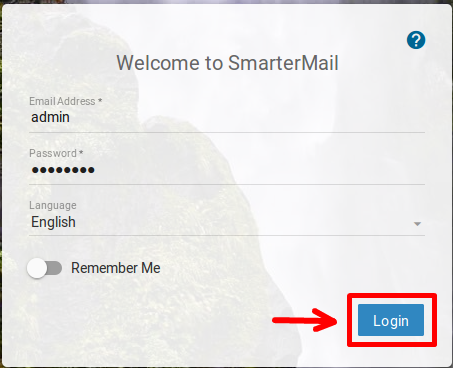
Login to your SmartmerMail panel with the user for which you want to reset the password.
Choose Settings.
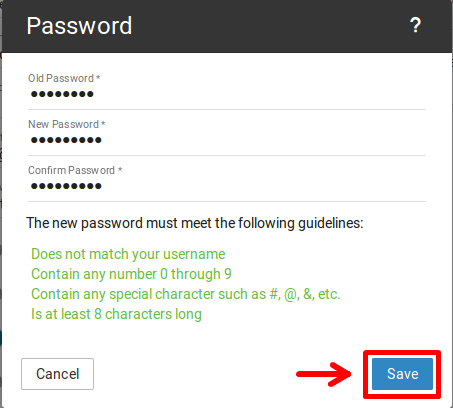
Click Change Password.
Write the old/new password and click Save.
Was this page helpful?
{"docsConfig":{"theme":"mint","$schema":"https://mintlify.com/docs.json","name":"Mochahost","colors":{"primary":"#5D31FF","light":"#20E0BA","dark":"#4A27CC"},"logo":{"light":"https://mintcdn.com/mochahost/urCuEw3qqBgMpYyZ/images/mochahost-logo-colour.png?fit=max\u0026auto=format\u0026n=urCuEw3qqBgMpYyZ\u0026q=85\u0026s=18c4d5a8792a1907c6e2a4f9d73520a1","dark":"https://mintcdn.com/mochahost/urCuEw3qqBgMpYyZ/images/mochahost-logo-on-dark.png?fit=max\u0026auto=format\u0026n=urCuEw3qqBgMpYyZ\u0026q=85\u0026s=43c61ddc601030dba0d9d93992e180c7"},"favicon":"https://mintlify.s3.us-west-1.amazonaws.com/mochahost/favicon.svg","styling":{"latex":true},"navigation":{"pages":[]}},"deployment":{"deploymentMetadataValue":{"subdomain":"mochahost","hasAudioNarration":false,"actualSubdomain":"mochahost","customDomains":["kb.mochahost.com"],"gitSource":{"type":"github","owner":"panaras10","repo":"mochahostdocuments","deployBranch":"v1.0","contentDirectory":"","isPrivate":true,"mountPath":"","label":""},"chroma":{"collectionId":"05b8cc92-6f9e-42c6-9a71-bae5ad52886e","liveDeploymentHistoryId":"6ac8ca1e6df55b4695dd3095","schemaVersion":"v3","latestBuiltDeploymentHistoryId":"6ac8ca1e6df55b4695dd3095"},"feedback":{"thumbs":true},"entitlements":{},"buildId":"6ac8ca1e6df55b4695dd3095","clientVersion":"0.0.3894","searchFilterCounts":[{"language":"default","tag":"E-Mail","count":71},{"language":"default","tag":"Web Server (Apache + IIS)","count":57},{"language":"default","tag":"Control Panel (cPanel)","count":53},{"language":"default","tag":"Managed hosting for WordPress powered by Rocket.net","count":50},{"language":"default","tag":"Programming Languages","count":40},{"language":"default","tag":"Databases","count":40},{"language":"default","tag":"Control Panel","count":37},{"language":"default","tag":"Virtual Private Servers (VPS) \u0026 Cloud","count":34},{"language":"default","tag":"WordPress","count":29},{"language":"default","tag":"Javapipe","count":24}]},"assistantConfig":{"enableAskAiButton":false,"enableStarterQuestions":false,"enableContextualStarterQuestions":false,"enableAskAiSearchBar":true},"hasChatPermissions":false,"hasWebMcpPermissions":false,"toggles":[{"name":"kill-isr","enabled":true,"variant":{"name":"disabled","enabled":false,"feature_enabled":true},"impressionData":false},{"name":"agent-mintlify-slack","enabled":true,"variant":{"name":"disabled","enabled":false,"feature_enabled":true},"impressionData":false},{"name":"editor-v7-file-tree","enabled":true,"variant":{"name":"disabled","enabled":false,"feature_enabled":true},"impressionData":false},{"name":"agent-integrations-settings","enabled":true,"variant":{"name":"disabled","enabled":false,"feature_enabled":true},"impressionData":false},{"name":"automations-pr-grouping","enabled":true,"variant":{"name":"disabled","enabled":false,"feature_enabled":true},"impressionData":false},{"name":"custom-prefix","enabled":true,"variant":{"name":"disabled","enabled":false,"feature_enabled":true},"impressionData":false},{"name":"analytics-v7","enabled":true,"variant":{"name":"disabled","enabled":false,"feature_enabled":true},"impressionData":false},{"name":"user-flows-analytics","enabled":true,"variant":{"name":"disabled","enabled":false,"feature_enabled":true},"impressionData":false},{"name":"no-publish-flow","enabled":true,"variant":{"name":"disabled","enabled":false,"feature_enabled":true},"impressionData":false},{"name":"workos-onboarding","enabled":true,"variant":{"name":"disabled","enabled":false,"feature_enabled":true},"impressionData":false},{"name":"llms-txt-v2","enabled":true,"variant":{"name":"disabled","enabled":false,"feature_enabled":true},"impressionData":false},{"name":"pause-universal-search-reconcile","enabled":true,"variant":{"name":"disabled","enabled":false,"feature_enabled":true},"impressionData":false},{"name":"snapshot-serving-live","enabled":true,"variant":{"name":"disabled","enabled":false,"feature_enabled":true},"impressionData":false},{"name":"stripTemperatureMiddleware","enabled":true,"variant":{"name":"disabled","enabled":false,"feature_enabled":true},"impressionData":false},{"name":"per-site-search-delta","enabled":true,"variant":{"name":"disabled","enabled":false,"feature_enabled":true},"impressionData":false},{"name":"support-platform-pylon-zendesk","enabled":true,"variant":{"name":"disabled","enabled":false,"feature_enabled":true},"impressionData":false},{"name":"editor-branches-v2-autocommit","enabled":true,"variant":{"name":"disabled","enabled":false,"feature_enabled":true},"impressionData":false},{"name":"editor-branches-v2","enabled":true,"variant":{"name":"disabled","enabled":false,"feature_enabled":true},"impressionData":false},{"name":"snapshot-serving","enabled":true,"variant":{"name":"disabled","enabled":false,"feature_enabled":true},"impressionData":false},{"name":"instant-rollback","enabled":true,"variant":{"name":"disabled","enabled":false,"feature_enabled":true},"impressionData":false},{"name":"granular-notifications-server","enabled":true,"variant":{"name":"disabled","enabled":false,"feature_enabled":true},"impressionData":false},{"name":"granular-notifications","enabled":true,"variant":{"name":"disabled","enabled":false,"feature_enabled":true},"impressionData":false},{"name":"editor-private-page-search","enabled":true,"variant":{"name":"disabled","enabled":false,"feature_enabled":true},"impressionData":false},{"name":"automations-fable","enabled":true,"variant":{"name":"disabled","enabled":false,"feature_enabled":true},"impressionData":false},{"name":"fixed-ai-action-pricing","enabled":true,"variant":{"name":"disabled","enabled":false,"feature_enabled":true},"impressionData":false},{"name":"automation-resolve-merge-conflict","enabled":true,"variant":{"name":"disabled","enabled":false,"feature_enabled":true},"impressionData":false},{"name":"scoped-publishing","enabled":true,"variant":{"name":"disabled","enabled":false,"feature_enabled":true},"impressionData":false},{"name":"mintql","enabled":true,"variant":{"name":"disabled","enabled":false,"feature_enabled":true},"impressionData":false},{"name":"page-level-analytics","enabled":true,"variant":{"name":"disabled","enabled":false,"feature_enabled":true},"impressionData":false},{"name":"teamspace","enabled":true,"variant":{"name":"disabled","enabled":false,"feature_enabled":true},"impressionData":false},{"name":"editor-version-history-v2","enabled":true,"variant":{"name":"disabled","enabled":false,"feature_enabled":true},"impressionData":false},{"name":"vite-origin","enabled":true,"variant":{"name":"disabled","enabled":false,"feature_enabled":true},"impressionData":false},{"name":"editor-nav-generations","enabled":true,"variant":{"name":"disabled","enabled":false,"feature_enabled":true},"impressionData":false},{"name":"workspace-projects","enabled":true,"variant":{"name":"disabled","enabled":false,"feature_enabled":true},"impressionData":false},{"name":"assistant-v5","enabled":true,"variant":{"name":"disabled","enabled":false,"feature_enabled":true},"impressionData":false},{"name":"byok-sep-25","enabled":true,"variant":{"name":"disabled","enabled":false,"feature_enabled":true},"impressionData":false},{"name":"revalidation-jwt","enabled":true,"variant":{"name":"disabled","enabled":false,"feature_enabled":true},"impressionData":false},{"name":"editor-agent-model-picker","enabled":true,"variant":{"name":"disabled","enabled":false,"feature_enabled":true},"impressionData":false},{"name":"client-snapshot-docs-config","enabled":true,"variant":{"name":"disabled","enabled":false,"feature_enabled":true},"impressionData":false},{"name":"hobby-abuse-scan","enabled":true,"variant":{"name":"disabled","enabled":false,"feature_enabled":true},"impressionData":false}],"isAtlas":false,"googleFontsInlined":false},"customCss":[],"page":{"pagePath":"docs/smartermail-password-reset-domain-user","slug":"/docs/smartermail-password-reset-domain-user","pageMetadata":{"title":"Smartermail Password Reset (Domain User)","description":null,"href":"/docs/smartermail-password-reset-domain-user"},"pageType":"default","mdx":{"mdxSource":{"compiledSource":"\"use strict\";const{Fragment:_Fragment,jsx:_jsx,jsxs:_jsxs}=arguments[0];const{useMDXComponents:_provideComponents}=arguments[0];function _createMdxContent(props){const _components={img:`img`,li:`li`,ol:`ol`,p:`p`,strong:`strong`,..._provideComponents(),...props.components};return _jsxs(_Fragment,{children:[_jsx(_components.p,{children:`To change a password from the Domain Mail User account via SmarterMail, please follow the steps below:`}),`\n`,_jsxs(_components.ol,{children:[`\n`,_jsx(_components.li,{children:`Login to your SmartmerMail panel with the user for which you want to reset the password.`}),`\n`]}),`\n`,_jsx(_components.p,{children:_jsx(_components.img,{src:`https://tutorials.my-virtual-panel.com/smartermail_reset_pass/1_Smartermail_reset_pass.png`,alt:``})}),`\n`,_jsxs(_components.ol,{start:`2`,children:[`\n`,_jsxs(_components.li,{children:[`Choose `,_jsx(_components.strong,{children:`Settings`}),`.`]}),`\n`]}),`\n`,_jsx(_components.p,{children:_jsx(_components.img,{src:`https://tutorials.my-virtual-panel.com/smartermail_reset_pass/1_USER_Smartermail_reset_pass.png`,alt:``})}),`\n`,_jsxs(_components.ol,{start:`3`,children:[`\n`,_jsxs(_components.li,{children:[`Click `,_jsx(_components.strong,{children:`Change Password`}),`.`]}),`\n`]}),`\n`,_jsx(_components.p,{children:_jsx(_components.img,{src:`https://tutorials.my-virtual-panel.com/smartermail_reset_pass/2_USER_Smartermail_reset_pass.png`,alt:``})}),`\n`,_jsxs(_components.ol,{start:`4`,children:[`\n`,_jsxs(_components.li,{children:[`Write the `,_jsx(_components.strong,{children:`old/new password`}),` and click `,_jsx(_components.strong,{children:`Save`}),`.`]}),`\n`]}),`\n`,_jsx(_components.p,{children:_jsx(_components.img,{src:`https://tutorials.my-virtual-panel.com/smartermail_reset_pass/3_USER_Smartermail_reset_pass.png`,alt:``})})]})}function MDXContent(props={}){const{wrapper:MDXLayout}={..._provideComponents(),...props.components};return MDXLayout?_jsx(MDXLayout,{...props,children:_jsx(_createMdxContent,{...props})}):_createMdxContent(props)}return{default:MDXContent}","frontmatter":{},"scope":{"config":{},"pageMetadata":{"title":"Smartermail Password Reset (Domain User)","description":null,"href":"/docs/smartermail-password-reset-domain-user"}}},"mdxSourceWithNoJs":null},"mdxExtracts":{"tableOfContents":[],"codeExamples":{}},"jsLinks":[],"subdomain":"mochahost","siteName":"Mochahost","title":"Smartermail Password Reset (Domain User) - Mochahost","navMaps":{"firstHrefInVersion":{},"firstHrefInLanguage":{}},"lastModified":"2026-08-07T10:56:40.318Z","originalFileLocation":"docs/smartermail-password-reset-domain-user.mdx"},"headHtml":"\u003cmeta data-mint-head name=\"application-name\" content=\"Mochahost\">\u003cmeta data-mint-head name=\"generator\" content=\"Mintlify\">\u003clink data-mint-head rel=\"icon\" type=\"image/png\" sizes=\"192x192\" href=\"/mintlify-assets/_mintlify/favicons/mochahost/z2LzVGB_f7FgYLuG/_generated/favicon/android-chrome-192x192.png\" media=\"(prefers-color-scheme: light)\">\u003clink data-mint-head rel=\"apple-touch-icon\" type=\"image/png\" sizes=\"180x180\" href=\"/mintlify-assets/_mintlify/favicons/mochahost/z2LzVGB_f7FgYLuG/_generated/favicon/apple-touch-icon.png\">\u003clink data-mint-head rel=\"icon\" type=\"image/png\" sizes=\"16x16\" href=\"/mintlify-assets/_mintlify/favicons/mochahost/z2LzVGB_f7FgYLuG/_generated/favicon/favicon-16x16.png\" media=\"(prefers-color-scheme: light)\">\u003clink data-mint-head rel=\"icon\" type=\"image/png\" sizes=\"32x32\" href=\"/mintlify-assets/_mintlify/favicons/mochahost/z2LzVGB_f7FgYLuG/_generated/favicon/favicon-32x32.png\" media=\"(prefers-color-scheme: light)\">\u003clink data-mint-head rel=\"shortcut icon\" type=\"image/x-icon\" href=\"/mintlify-assets/_mintlify/favicons/mochahost/z2LzVGB_f7FgYLuG/_generated/favicon/favicon.ico\" media=\"(prefers-color-scheme: light)\">\u003clink data-mint-head rel=\"icon\" type=\"image/png\" sizes=\"192x192\" href=\"/mintlify-assets/_mintlify/favicons/mochahost/z2LzVGB_f7FgYLuG/_generated/favicon-dark/android-chrome-192x192.png\" media=\"(prefers-color-scheme: dark)\">\u003clink data-mint-head rel=\"icon\" type=\"image/png\" sizes=\"16x16\" href=\"/mintlify-assets/_mintlify/favicons/mochahost/z2LzVGB_f7FgYLuG/_generated/favicon-dark/favicon-16x16.png\" media=\"(prefers-color-scheme: dark)\">\u003clink data-mint-head rel=\"icon\" type=\"image/png\" sizes=\"32x32\" href=\"/mintlify-assets/_mintlify/favicons/mochahost/z2LzVGB_f7FgYLuG/_generated/favicon-dark/favicon-32x32.png\" media=\"(prefers-color-scheme: dark)\">\u003clink data-mint-head rel=\"shortcut icon\" type=\"image/x-icon\" href=\"/mintlify-assets/_mintlify/favicons/mochahost/z2LzVGB_f7FgYLuG/_generated/favicon-dark/favicon.ico\" media=\"(prefers-color-scheme: dark)\">\u003cmeta data-mint-head property=\"og:title\" content=\"Smartermail Password Reset (Domain User) - Mochahost\">\u003cmeta data-mint-head property=\"og:site_name\" content=\"Mochahost\">\u003cmeta data-mint-head property=\"og:url\" content=\"https://kb.mochahost.com/docs/smartermail-password-reset-domain-user\">\u003cmeta data-mint-head property=\"og:type\" content=\"website\">\u003cmeta data-mint-head name=\"twitter:card\" content=\"summary_large_image\">\u003cmeta data-mint-head name=\"twitter:title\" content=\"Smartermail Password Reset (Domain User) - Mochahost\">\u003cmeta data-mint-head name=\"msapplication-config\" content=\"/mintlify-assets/_mintlify/favicons/mochahost/z2LzVGB_f7FgYLuG/_generated/favicon/browserconfig.xml\">\u003cmeta data-mint-head name=\"apple-mobile-web-app-title\" content=\"Mochahost\">\u003cmeta data-mint-head name=\"msapplication-TileColor\" content=\"#5D31FF\">\u003clink data-mint-head rel=\"canonical\" href=\"https://kb.mochahost.com/docs/smartermail-password-reset-domain-user\">\u003clink data-mint-head rel=\"alternate\" type=\"application/xml\" href=\"/sitemap.xml\">\u003clink data-mint-head rel=\"alternate\" type=\"text/markdown\" href=\"/docs/smartermail-password-reset-domain-user.md\">\u003cscript data-mint-head type=\"application/ld+json\">{\"@context\":\"https://schema.org\",\"@graph\":[{\"@type\":\"Organization\",\"@id\":\"https://kb.mochahost.com/#organization\",\"name\":\"Mochahost\",\"url\":\"https://kb.mochahost.com\",\"logo\":{\"@type\":\"ImageObject\",\"url\":\"https://mintcdn.com/mochahost/urCuEw3qqBgMpYyZ/images/mochahost-logo-colour.png?fit=max\u0026auto=format\u0026n=urCuEw3qqBgMpYyZ\u0026q=85\u0026s=18c4d5a8792a1907c6e2a4f9d73520a1\"}},{\"@type\":\"WebSite\",\"@id\":\"https://kb.mochahost.com#website\",\"name\":\"Mochahost\",\"url\":\"https://kb.mochahost.com\",\"publisher\":{\"@id\":\"https://kb.mochahost.com/#organization\"}},{\"@type\":\"WebPage\",\"@id\":\"https://kb.mochahost.com/docs/smartermail-password-reset-domain-user#webpage\",\"url\":\"https://kb.mochahost.com/docs/smartermail-password-reset-domain-user\",\"name\":\"Smartermail Password Reset (Domain User)\",\"dateModified\":\"2026-08-07T10:56:40.318Z\",\"isPartOf\":{\"@id\":\"https://kb.mochahost.com#website\"},\"breadcrumb\":{\"@id\":\"https://kb.mochahost.com/docs/smartermail-password-reset-domain-user#breadcrumb\"}},{\"@type\":\"BreadcrumbList\",\"@id\":\"https://kb.mochahost.com/docs/smartermail-password-reset-domain-user#breadcrumb\",\"itemListElement\":[{\"@type\":\"ListItem\",\"position\":1,\"name\":\"E-Mail\",\"item\":\"https://kb.mochahost.com/docs/email-limitations-for-shared-and-private-servers\"},{\"@type\":\"ListItem\",\"position\":2,\"name\":\"Smartermail Password Reset (Domain User)\",\"item\":\"https://kb.mochahost.com/docs/smartermail-password-reset-domain-user\"}]},{\"@type\":[\"Article\",\"TechArticle\"],\"@id\":\"https://kb.mochahost.com/docs/smartermail-password-reset-domain-user#article\",\"headline\":\"Smartermail Password Reset (Domain User)\",\"name\":\"Smartermail Password Reset (Domain User)\",\"url\":\"https://kb.mochahost.com/docs/smartermail-password-reset-domain-user\",\"mainEntityOfPage\":{\"@id\":\"https://kb.mochahost.com/docs/smartermail-password-reset-domain-user#webpage\"},\"dateModified\":\"2026-08-07T10:56:40.318Z\",\"publisher\":{\"@id\":\"https://kb.mochahost.com/#organization\"},\"isPartOf\":{\"@id\":\"https://kb.mochahost.com#website\"}}]}\u003c/script>\u003cscript data-mint-head type=\"application/ld+json\">{\"@context\":\"https://schema.org\",\"@type\":\"WebSite\",\"name\":\"Mochahost\",\"creator\":{\"@type\":\"Organization\",\"name\":\"Mintlify\",\"url\":\"https://mintlify.com\"}}\u003c/script>","siteName":"Mochahost","nav":{"global":null,"groups":[{"group":"Hosting Panel","pages":[{"title":"Accessing the Hosting Panel","href":"/docs/accessing-the-hosting-panel"},{"title":"Managing your profile in the Hosting Panel","href":"/docs/managing-your-profile-in-the-hosting-panel"},{"title":"Managing billing in the Hosting Panel","href":"/docs/managing-billing-in-the-hosting-panel"},{"title":"Viewing your Support PIN","href":"/docs/viewing-your-support-pin"},{"title":"Working with tickets in the Hosting Panel","href":"/docs/working-with-tickets"},{"title":"Updating the default email address for your account","href":"/docs/updating-the-default-email-address-for-your-account"},{"title":"Viewing and changing settings for cPanel hosting accounts","href":"/docs/viewing-and-changing-settings-for-shared-hosting-accounts"},{"title":"Renewing a domain purchased from Mochahost","href":"/docs/renewing-a-domain"},{"title":"Domain management in the Hosting Panel","href":"/docs/domain-management-in-the-hosting-panel"},{"title":"Requesting site migration from another host to Mochahost","href":"/docs/site-migration-request"},{"title":"Managing DNS settings in the Hosting Panel","href":"/docs/managing-dns-settings-in-the-hosting-panel"},{"title":"Upgrading or downgrading your hosting plan","href":"/docs/upgrading-or-downgrading-your-hosting-plan"},{"title":"Cancelling a product or service on the Hosting Panel","href":"/docs/cancelling-a-product-or-service-on-the-hosting-panel"},{"title":"Recovering account access","href":"/docs/recovering-account-access"}]},{"group":"Control Panel","pages":[{"title":"Your IP address has changed. Please log in again (cPanel)","href":"/docs/your-ip-address-has-changed-please-log-in-again-cpanel"},{"title":"SolidCP Server information (Space summary) - Database","href":"/docs/solidcp-server-information-space-summary-database"},{"title":"Setting up default.aspx","href":"/docs/setting-up-defaultaspx"},{"title":"SolidCP Upload limits","href":"/docs/solidcp-upload-limits"},{"title":"How to connect to FTP with Web Browser? - cPanel","href":"/docs/how-to-connect-to-ftp-with-web-browser-cpanel"},{"title":"How to install PEAR?","href":"/docs/how-to-install-pear-1"},{"title":"Certificate (SSL) Error","href":"/docs/certificate-ssl-error"},{"title":"Resource Limit Reached error","href":"/docs/resource-limit-reached-error"},{"title":"How to reduce disk space on a cPanel server (for VPS/Cloud clients only)","href":"/docs/how-to-reduce-disk-space-on-a-cpanel-server-for-vpscloud-clients-only"},{"title":"How to deploy a WAR (Web application ARchive) in the NGASI Panel","href":"/docs/how-to-deploy-a-war-web-application-archive-in-the-ngasi-panel"},{"title":"Setting up DNS records for your domain in CloudFlare","href":"/docs/setting-up-dns-records-for-your-domain-in-cloudflare"},{"title":"Free Search Engine Optimization (SEO) Tools by Attracta - CPanel","href":"/docs/free-search-engine-optimization-seo-tools-by-attractatm-cpanel"},{"title":"How can I reset my cPanel password? (Forgot password assistance)","href":"/docs/how-can-i-reset-my-cpanel-password-forgot-password-assistance"},{"title":"Let\"s Encrypt - SolidCP","href":"/docs/lets-encrypt-solidcp"},{"title":"How to re-direct a domain name and keep the original URL in the browser","href":"/docs/how-to-re-direct-a-domain-name-and-keep-the-original-url-in-the-browser"},{"title":"URL Redirection for Windows plans (web.config)","href":"/docs/url-redirection-for-windows-plans-webconfig"},{"title":"CloudFlare cPanel plugin deprecated","href":"/docs/cloudflare-cpanel-plugin-deprecated"},{"title":"How to change your PHP version in SolidCP","href":"/docs/how-to-change-your-php-version-in-solidcp-1"},{"title":"SolidCP End user series","href":"/docs/solidcp-end-user-series"},{"title":"Google Mail Fetcher (SolidCP)","href":"/docs/google-mail-fetcher-solidcp"},{"title":"Allow/Deny IPs via web.config (SolidCP)","href":"/docs/allowdeny-ips-via-webconfig-solidcp-1"},{"title":"Popular CMS/E-commerce Connection String configuration (Windows)","href":"/docs/popular-cmse-commerce-connection-string-configuration-windows"},{"title":"Setting multiple versions of ASP.NET and PHP under your Website (SolidCP Virtual Applications)","href":"/docs/setting-multiple-versions-of-aspnet-and-php-under-your-website-solidcp-virtual-applications"},{"title":"Configuring IIS Remote Management on a Shared Server (SolidCP)","href":"/docs/configuring-iis-remote-management-on-a-shared-server-solidcp"},{"title":"Wordpress installation under Web App Gallery (SolidCP)","href":"/docs/wordpress-installation-under-web-app-gallery-solidcp"},{"title":"SolidCP Redirect URL","href":"/docs/solidcp-redirect-url"},{"title":"Jetbackup complete overview","href":"/docs/jetbackup-complete-overview"},{"title":"Setup Spam Filtering for SmarterMail email-account (SolidCP)","href":"/docs/setup-spam-filtering-for-smartermail-email-account-solidcp"},{"title":"How to manage your Application Pool in SolidCP","href":"/docs/how-to-manage-your-application-pool-in-solidcp"},{"title":"SolidCP Reseller series","href":"/docs/solidcp-reseller-series"},{"title":"Web Application Firewall (WAF) - mod_security","href":"/docs/web-application-firewall-waf-mod_security-2"},{"title":"Backup and Restore","href":"/docs/backup-and-restore"},{"title":"Fixing Cpanel \"Your IP address has changed. Please log in again\" (VPS/Cloud)","href":"/docs/fixing-cpanel-your-ip-address-has-changed-please-log-in-again-vpscloud"},{"title":"How to upload your Android/IOS files via SolidCP","href":"/docs/how-to-upload-your-androidios-files-via-solidcp-1"},{"title":"How to connect to FTP with Web Browser? - SolidCP","href":"/docs/how-to-connect-to-ftp-with-web-browser-solidcp-1"},{"title":"Mochahost Console Overview","href":"/docs/mochahost-console-overview"},{"title":"How to change permissions in SolidCP panel","href":"/docs/how-to-change-permissions-in-solidcp-panel-1"}]},{"group":"Domain Names","pages":[{"title":"Setup Private Nameservers (SolidCP)","href":"/docs/setup-private-nameservers-solidcp"},{"title":"Registering Private DNS servers at other Registrars (VPS)","href":"/docs/registering-private-dns-servers-at-other-registrars-vps"},{"title":"Accessing your web site before DNS propagation is complete","href":"/docs/accessing-your-website-before-DNS-propagation"}]},{"group":"WHMCS","pages":[{"title":"Creating and Managing Support Tickets in the Client Area","href":"/docs/creating-and-managing-support-tickets-in-the-client-area"},{"title":"How to Update Your Billing Information/Personal Details in the Client Area","href":"/docs/how-to-update-your-billing-informationpersonal-details-in-the-client-area"},{"title":"How To Login Into The Client Area","href":"/docs/how-to-login-into-the-client-area"},{"title":"How to Pay Invoices in the Client Area","href":"/docs/how-to-pay-invoices-in-the-client-area"}]},{"group":"Billing \u0026 Order Questions","pages":[{"title":"Payment Methods","href":"/docs/payment-methods"},{"title":"Where to pay my bill?","href":"/docs/where-to-pay-my-bill"},{"title":"Account Activation Time","href":"/docs/account-activation-time"},{"title":"Automatic Payments via Credit Card or PayPal Subscription","href":"/docs/automatic-payments-via-credit-card-or-paypal-subscription"},{"title":"We offer a 30-days money-back guarantee","href":"/docs/we-offer-a-30-days-money-back-guarantee"},{"title":"How do I Downgrade my account?","href":"/docs/how-do-i-downgrade-my-account"},{"title":"How do I get my 30 days money back refund ?","href":"/docs/how-do-i-get-my-30-days-money-back-refund"},{"title":"How do I switch from Linux to Windows (or vice versa) ?","href":"/docs/how-do-i-switch-from-linux-to-windows-or-vice-versa"},{"title":"Payment terms (cycles)","href":"/docs/payment-terms-cycles"},{"title":"How do I order?","href":"/docs/how-do-i-order"},{"title":"No Hidden Fees","href":"/docs/no-hidden-fees"},{"title":"Your order cannot be processed \"Error 11134\"","href":"/docs/your-order-cannot-be-processed-error-11134"},{"title":"How to make a payment via Bank Transfer","href":"/docs/how-to-make-a-payment-via-bank-transfer"},{"title":"We offer easy Upgrade options","href":"/docs/we-offer-easy-upgrade-options"}]},{"group":"Offers \u0026 limitations","pages":[{"title":"Content Restrictions and DMCA Compliance","href":"/docs/content-restrictions-and-dmca-compliance"}]},{"group":"Domains \u0026 Sub Domains","pages":[{"title":"We offer Domain Identity Protection (Private Domain Registration)","href":"/docs/we-offer-domain-identity-protection-private-domain-registration"},{"title":"What is a CNAME?","href":"/docs/what-is-a-cname"},{"title":"Transferring Domains from Other Registrars to MochaHost","href":"/docs/transferring-domains-from-other-registrars-to-mochahost"},{"title":"We support unlimited sub-domains per account","href":"/docs/we-support-unlimited-sub-domains-per-account"},{"title":"Reported Attack Site","href":"/docs/reported-attack-site"},{"title":"What is an A Record?","href":"/docs/what-is-an-a-record"},{"title":"How does DNS work?","href":"/docs/how-does-dns-work"},{"title":"Main Domain change - cPanel","href":"/docs/main-domain-change-cpanel"},{"title":"Domain Search","href":"/docs/domain-search-1"},{"title":"ICANN Registration Data Policy changes","href":"/docs/icann-registration-data-policy-changes"}]},{"group":"Control Panel Plesk:Odin for Linux:Windows (VPS:Cloud only)","pages":[{"title":"Plesk - End User Tutorials","href":"/docs/plesk-end-user-tutorials"},{"title":"Plesk to Plesk Migration","href":"/docs/plesk-to-plesk-migration"},{"title":"Plesk 10 - Reseller Tutorials","href":"/docs/plesk-10-reseller-tutorials"},{"title":"Enabling SPF and DKIM Records (Plesk)","href":"/docs/enabling-spf-and-dkim-records-plesk"},{"title":"Plesk 9 - End User Tutorials","href":"/docs/plesk-9-end-user-tutorials"},{"title":"Plesk 9 - Reseller Tutorials","href":"/docs/plesk-9-reseller-tutorials"}]},{"group":"WordPress","pages":[{"title":"WordPress Migration - using All-in-One WP Migration plugin","href":"/docs/wordpress-migration-using-all-in-one-wp-migration-plugin-1"},{"title":"Accessing WordPress Managed by MochaHost","href":"/docs/accessing-wordpress-managed-by-mochahost"},{"title":"Restore WordPress backup","href":"/docs/restore-wordpress-backup"},{"title":"Wordpress Optimizations with Redis and W3 Total Cache","href":"/docs/wordpress-optimizations-with-redis-and-w3-total-cache"},{"title":"Push WordPress staging site to live","href":"/docs/push-wordpress-staging-site-to-live"},{"title":"Configure Memcached Wordpress plugin with Unix socket","href":"/docs/configure-memcached-wordpress-plugin-with-unix-socket"},{"title":"Create WordPress Staging site","href":"/docs/create-wordpress-staging-site"},{"title":"Wordpress Password Reset trough CPanel","href":"/docs/wordpress-password-reset-trough-cpanel"},{"title":"Wordpress Import","href":"/docs/wordpress-import"},{"title":"WordPress - Online Tutorials","href":"/docs/wordpress-online-tutorials"},{"title":"WooCommerce - Disable Cart Fragments","href":"/docs/woocommerce-disable-cart-fragments"},{"title":"Auto Upgrade WordPress Core Settings","href":"/docs/auto-upgrade-wordpress-core-settings"},{"title":"WordPress Slow Plugins- to stay away from","href":"/docs/wordpress-slow-plugins-to-stay-away-from"},{"title":"Change WordPress Site URL","href":"/docs/change-wordpress-site-url"},{"title":"Change WordPress Password","href":"/docs/change-wordpress-password"},{"title":"Upgrade WordPress Installation","href":"/docs/upgrade-wordpress-installation"},{"title":"How to clone Wordpress installation","href":"/docs/how-to-clone-wordpress-installation"},{"title":"WordPress Managed by MochaHost","href":"/docs/wordpress-managed-by-mochahost"},{"title":"How to enable LSCache for WooCommerce","href":"/docs/how-to-enable-lscache-for-woocommerce-1"},{"title":"How to enable LSCache for Wordpress","href":"/docs/how-to-enable-lscache-for-wordpress-1"},{"title":"Auto Login to WordPress admin panel","href":"/docs/auto-login-to-wordpress-admin-panel"},{"title":"Enable/Disable WordPress Debug Mode","href":"/docs/enabledisable-wordpress-debug-mode"},{"title":"Improve Wordpress speed with Memcached","href":"/docs/improve-wordpress-speed-with-memcached"},{"title":"Enable/Disable WordPress CRON","href":"/docs/enabledisable-wordpress-cron"},{"title":"Create WordPress backup","href":"/docs/create-wordpress-backup"},{"title":"Auto Upgrade WordPress Plugins/Themes Settings","href":"/docs/auto-upgrade-wordpress-pluginsthemes-settings"},{"title":"How to change Wordpress admin password","href":"/docs/how-to-change-wordpress-admin-password"},{"title":"Change WordPress Site Name","href":"/docs/change-wordpress-site-name"},{"title":"Optimizing WordPress with the WP Rocket plugin","href":"/docs/optimizing-wordpress-with-the-wp-rocket-plugin"}]},{"group":"Reseller Solutions","pages":[{"title":"Reseller Plans - Unlimited Sites","href":"/docs/reseller-plans-unlimited-sites"},{"title":"Reseller Plans","href":"/docs/reseller-plans"},{"title":"Master Reseller Account","href":"/docs/master-reseller-account"},{"title":"ENOM Reseller","href":"/docs/enom-reseller"},{"title":"Plesk branding (reseller accounts)","href":"/docs/plesk-branding-reseller-accounts-1"}]},{"group":"FTP","pages":[{"title":"Switching from Passive/Active mode in FileZilla","href":"/docs/switching-from-passiveactive-mode-in-filezilla"},{"title":"We support SSH / SFTP","href":"/docs/we-support-ssh-sftp"},{"title":"Free FTP software","href":"/docs/free-ftp-software"},{"title":"I keep getting an error when trying to FTP","href":"/docs/i-keep-getting-an-error-when-trying-to-ftp"},{"title":"Does Mochahost support ftps and sftp?","href":"/docs/does-mochahost-support-ftps-and-sftp"},{"title":"FileZilla FTP client","href":"/docs/filezilla-ftp-client"},{"title":"FileZilla TLS Issue","href":"/docs/filezilla-tls-issue"},{"title":"FTP username for Windows server","href":"/docs/ftp-username-for-windows-server"},{"title":"Where do I upload my site files?","href":"/docs/where-do-i-upload-my-site-files"},{"title":"Connecting via FTPS to a Shared Linux Server","href":"/docs/connecting-via-ftps-to-a-shared-linux-server"},{"title":"How to setup FileZilla","href":"/docs/how-to-setup-filezilla"},{"title":"We offer unlimited FTP accounts.","href":"/docs/we-offer-unlimited-ftp-accounts"},{"title":"What is my FTP username and password?","href":"/docs/what-is-my-ftp-username-and-password"},{"title":"How to switch between ACTIVE/PASSIVE mode in SMART FTP","href":"/docs/how-to-switch-between-activepassive-mode-in-smart-ftp"}]},{"group":"Affiliate:Refferal Program","pages":[{"title":"Affiliate/Referral Program Overview","href":"/docs/affiliatereferral-program-overview"}]},{"group":"General (Pre-Sales)","pages":[{"title":"We provide cPanel Control Panel (demo available)","href":"/docs/we-provide-cpanel-control-panel-demo-available"},{"title":"We support CRON jobs scheduling","href":"/docs/we-support-cron-jobs-scheduling"},{"title":"We provide cPanel Control Panel (demo available)","href":"/docs/we-provide-cpanel-control-panel-demo-available-1"},{"title":"We have support for MySQL 5.x","href":"/docs/we-have-support-for-mysql-5x-1"},{"title":"We have support for PHP versions 5.x and 7.x","href":"/docs/we-have-support-for-php-versions-5x-7x"},{"title":"Support of third party applications","href":"/docs/support-of-third-party-applications"},{"title":"We don\"t host sites with adult content.","href":"/docs/we-dont-host-sites-with-adult-content"},{"title":"MS SQL 2005 / 2008 Features","href":"/docs/ms-sql-2005-2008-features"},{"title":"Silverlight 2.0","href":"/docs/silverlight-20"},{"title":"Full plan details","href":"/docs/full-plan-details-1"},{"title":"SVN (subversion) support","href":"/docs/svn-subversion-support-2"},{"title":"Payment Methods supported by MochaHost","href":"/docs/payment-methods-supported-by-mochahost"},{"title":"We offer a dedicated/static IP address","href":"/docs/we-offer-a-dedicatedstatic-ip-address"},{"title":"We have support for JSP/Tomcat","href":"/docs/we-have-support-for-jsptomcat"},{"title":"Server Specifications","href":"/docs/server-specifications-1"},{"title":"GDPR compliant","href":"/docs/gdpr-compliant"},{"title":"Servers location","href":"/docs/servers-location"},{"title":"Free Site Builder with 500 + templates","href":"/docs/free-site-builder-with-500-templates"},{"title":"What is a Free Domain?","href":"/docs/what-is-a-free-domain"},{"title":"Ruby on Rails","href":"/docs/ruby-on-rails"}]},{"group":"Web Design","pages":[{"title":"SiteBuilder eshop Support Payment Modules","href":"/docs/sitebuilder-eshop-support-payment-modules"},{"title":"Site Builder Browser Compatibility","href":"/docs/site-builder-browser-compatibility"},{"title":"Can I use my files and upload my own site?","href":"/docs/can-i-use-my-files-and-upload-my-own-site"},{"title":"How to reset WordPress password?","href":"/docs/how-to-reset-wordpress-password"},{"title":"How do I create a mailto link on my page?","href":"/docs/how-do-i-create-a-mailto-link-on-my-page-1"},{"title":"Custom 404 \"Page Not Found\" on your site","href":"/docs/custom-404-page-not-found-on-your-site"},{"title":"Setup Laravel Application from cPanel (Linux standard cloud plans)","href":"/docs/setup-laravel-application-from-cpanel-linux-standard-cloud-plans"},{"title":"DotNetNuke Optimizations","href":"/docs/dotnetnuke-optimizations"},{"title":"Site Builder Tutorials","href":"/docs/site-builder-tutorials-1"},{"title":"Website Performance Optimization Tips","href":"/docs/website-performance-optimization-tips"},{"title":"Managing Node.JS with cPanel (standard cloud linux packages)","href":"/docs/managing-nodejs-with-cpanel-standard-cloud-linux-packages"},{"title":"OpenCart Optimization Steps","href":"/docs/opencart-optimization-steps"},{"title":"We offer custom design services","href":"/docs/we-offer-custom-design-services"},{"title":"How to fix WordPress white screen (cPanel or FTP)","href":"/docs/how-to-fix-wordpress-white-screen-cpanel-or-ftp"},{"title":"We offer a Free Web Site Builder","href":"/docs/we-offer-a-free-web-site-builder"},{"title":"Site builder publishing error","href":"/docs/site-builder-publishing-error"},{"title":"WEB BUILDER - ONLINE TUTORIALS","href":"/docs/web-builder-online-tutorials"}]},{"group":"E-Mail","pages":[{"title":"Email Limitations for Shared and Private Servers","href":"/docs/email-limitations-for-shared-and-private-servers"},{"title":"How do I set up e-mail accounts in Outlook Express 5.X?","href":"/docs/how-do-i-set-up-e-mail-accounts-in-outlook-express-5x"},{"title":"How do I protect myself against a computer virus?","href":"/docs/how-do-i-protect-myself-against-a-computer-virus"},{"title":"Do you have a Webmail feature that I can use to check my mail from my browser?","href":"/docs/do-you-have-a-webmail-feature-that-i-can-use-to-check-my-mail-from-my-browser"},{"title":"How do I set up e-mail accounts in Netscape Messenger 4.5?","href":"/docs/how-do-i-set-up-e-mail-accounts-in-netscape-messenger-45"},{"title":"How do I set up e-mail accounts in Outlook 2013","href":"/docs/how-do-i-set-up-e-mail-accounts-in-outlook-2013"},{"title":"How do I set up e-mail accounts in Outlook 2002 (Outlook XP)?","href":"/docs/how-do-i-set-up-e-mail-accounts-in-outlook-2002-outlook-xp"},{"title":"How do I set up Mail for Mac OS X?","href":"/docs/how-do-i-set-up-mail-for-mac-os-x"},{"title":"I received new messages in my email program at home","href":"/docs/i-received-new-messages-in-my-email-program-at-home"},{"title":"How do I set up my e-mail in Eudora 5.2?","href":"/docs/how-do-i-set-up-my-e-mail-in-eudora-52"},{"title":"I\"m getting a \"relay denied\" error message when trying to send my mail.","href":"/docs/im-getting-a-relay-denied-error-message-when-trying-to-send-my-mail"},{"title":"How do I view e-mail headers in Outlook 98/2000/2002/XP?","href":"/docs/how-do-i-view-e-mail-headers-in-outlook-9820002002xp"},{"title":"Emails are throttled (SmarterMail)","href":"/docs/emails-are-throttled-smartermail"},{"title":"How can I send out emails to my customers from a web browser or when I am away from the office?","href":"/docs/how-can-i-send-out-emails-to-my-customers-from-a-web-browser-or-when-i-am-away-from-the-office"},{"title":"Changing the webmail time zone (Shared Linux accounts)","href":"/docs/changing-the-webmail-time-zone-shared-linux-accounts"},{"title":"Enabling SPF and DKIM Records (SolidCP)","href":"/docs/enabling-spf-and-dkim-records-solidcp"},{"title":"What is the difference between POP3 email accounts","href":"/docs/what-is-the-difference-between-pop3-email-accounts"},{"title":"Problems sending emails using MochaHost's mail server (SMTP Restrictions)","href":"/docs/problems-sending-emails-using-mochahosts-mail-server-smtp-restrictions"},{"title":"Does my mailbox have any limits on it?","href":"/docs/does-my-mailbox-have-any-limits-on-it"},{"title":"Outlook error 0x80042108","href":"/docs/outlook-error-0x80042108"},{"title":"How do I set up e-mail accounts in Netscape Messenger 4.01?","href":"/docs/how-do-i-set-up-e-mail-accounts-in-netscape-messenger-401"},{"title":"How to request an IP de-listing from a blacklist","href":"/docs/how-to-request-an-ip-de-listing-from-a-blacklist"},{"title":"Adding an anti-spam filter for MochaHost in Gmail","href":"/docs/adding-an-anti-spam-filter-for-mochahost-in-gmail"},{"title":"How do I set up e-mail accounts in Outlook Express 4.0?","href":"/docs/how-do-i-set-up-e-mail-accounts-in-outlook-express-40"},{"title":"Problems retrieving e-mail with Norton Anti-Virus installed.","href":"/docs/problems-retrieving-e-mail-with-norton-anti-virus-installed"},{"title":"I keep getting the error \"0x800ccc0f The connection to the server was interrupted\"","href":"/docs/i-keep-getting-the-error-0x800ccc0f-the-connection-to-the-server-was-interrupted"},{"title":"How do I set up e-mail accounts in Outlook Express 6?","href":"/docs/how-do-i-set-up-e-mail-accounts-in-outlook-express-6"},{"title":"How do I set up mail for Netscape 6.x?","href":"/docs/how-do-i-set-up-mail-for-netscape-6x"},{"title":"How do I view e-mail headers in Netscape 6.x or 7.x?","href":"/docs/how-do-i-view-e-mail-headers-in-netscape-6x-or-7x"},{"title":"What is an email catch-all address?","href":"/docs/what-is-an-email-catch-all-address"},{"title":"How do I set up e-mail accounts in Outlook 2000?","href":"/docs/how-do-i-set-up-e-mail-accounts-in-outlook-2000"},{"title":"Set Up My Email in Eudora 7.1","href":"/docs/set-up-my-email-in-eudora-71"},{"title":"What are E-mail Headers?","href":"/docs/what-are-e-mail-headers"},{"title":"Outlook error while trying to send email - 0x800c8101","href":"/docs/outlook-error-while-trying-to-send-email-0x800c8101"},{"title":"Does Mochahost offer any spam filtering tools?","href":"/docs/does-mochahost-offer-any-spam-filtering-tools"},{"title":"How do I set up e-mail accounts in Outlook 2016","href":"/docs/how-do-i-set-up-e-mail-accounts-in-outlook-2016"},{"title":"What is the purpose of an auto-responder?","href":"/docs/what-is-the-purpose-of-an-auto-responder"},{"title":"How to change the time zone of webmail clients","href":"/docs/how-to-change-the-time-zone-of-webmail-clients"},{"title":"How to configure SmarterMail to open with webmail.domain.com","href":"/docs/how-to-configure-smartermail-to-open-with-webmaildomaincom"},{"title":"What is the maximum size that an attachment can be when using web mail?","href":"/docs/what-is-the-maximum-size-that-an-attachment-can-be-when-using-web-mail"},{"title":"We offer an unlimited number of users/mailboxes.","href":"/docs/we-offer-an-unlimited-number-of-usersmailboxes"},{"title":"Synchronizing SmarterMail with Outlook","href":"/docs/synchronizing-smartermail-with-outlook"},{"title":"How do I view e-mail headers in Mail for Mac OS X?","href":"/docs/how-do-i-view-e-mail-headers-in-mail-for-mac-os-x"},{"title":"Email Migration with SmarterMail (SolidCP)","href":"/docs/email-migration-with-smartermail-solidcp"},{"title":"MX Records - changing to a remote Mail Server","href":"/docs/mx-records-changing-to-a-remote-mail-server"},{"title":"To set up Message Filters (Message Rules) in Outlook Express","href":"/docs/to-set-up-message-filters-message-rules-in-outlook-express"},{"title":"SmarterMail Changing Mailing List Poster Address (SolidCP)","href":"/docs/smartermail-changing-mailing-list-poster-address-solidcp"},{"title":"How to configure Google MX records?","href":"/docs/how-to-configure-google-mx-records"},{"title":"Is there a limit to the size of the attachment that I can send with webmail?","href":"/docs/is-there-a-limit-to-the-size-of-the-attachment-that-i-can-send-with-webmail"},{"title":"Setting up your e-mail client manually (cPanel)","href":"/docs/setting-up-your-e-mail-client-manually-cpanel"},{"title":"What is the difference between using IMAP or POP for my mail?","href":"/docs/what-is-the-difference-between-using-imap-or-pop-for-my-mail"},{"title":"Issues with Outlook email client","href":"/docs/issues-with-outlook-email-client"},{"title":"We offer an unlimited number of e-mail forwarders.","href":"/docs/we-offer-an-unlimited-number-of-e-mail-forwarders"},{"title":"How do I set up mail for Netscape 7.x?","href":"/docs/how-do-i-set-up-mail-for-netscape-7x"},{"title":"Migrating emails via CPanel Webmail (Horde/RoundCube)","href":"/docs/migrating-emails-via-cpanel-webmail-horderoundcube"},{"title":"How to whitelist the MochaHost domains (mochahost.com and mochasupport.com) under Outlook","href":"/docs/how-to-whitelist-the-mochahost-domains-mochahostcom-and-mochasupportcom-under-outlook"},{"title":"Sending e-mails using ASP and CDOSYS","href":"/docs/sending-e-mails-using-asp-and-cdosys"},{"title":"How to transfer my e-mails?","href":"/docs/how-to-transfer-my-e-mails"},{"title":"How do I view e-mail headers in Outlook Express 5.x or 6.x?","href":"/docs/how-do-i-view-e-mail-headers-in-outlook-express-5x-or-6x"},{"title":"SmarterMail Changing Mailing List Poster Address","href":"/docs/smartermail-changing-mailing-list-poster-address"},{"title":"What is my incoming (POP3/IMAP) and outgoing (SMTP) mail server name?","href":"/docs/what-is-my-incoming-pop3imap-outgoing-smtp-mail-server-name"},{"title":"Enabling SPF and DKIM Records (Cpanel)","href":"/docs/enabling-spf-and-dkim-records-cpanel"},{"title":"Reason and fix for \"Domain has exceeded the max defers and failures per hour\"","href":"/docs/reason-and-fix-for-domain-has-exceeded-the-max-defers-and-failures-per-hour"},{"title":"Persist\"s aspmail","href":"/docs/persists-aspmail"},{"title":"DomainKeys and DKIM (Linux cPanel accounts)","href":"/docs/domainkeys-dkim-linux-cpanel-accounts"},{"title":"How do I create a mailto link on my page?","href":"/docs/how-do-i-create-a-mailto-link-on-my-page"},{"title":"Configuring SMTP Authentication in Outlook (v.2016)","href":"/docs/configuring-smtp-authentication-in-outlook-v2016"},{"title":"Managing the Spam Experts service","href":"/docs/managing-the-spam-experts-service"},{"title":"Smartermail Password Reset (Domain Administrator)","description":null,"href":"/docs/smartermail-password-reset-domain-administrator"},{"title":"Smartermail Password Reset (Domain User)","href":"/docs/smartermail-password-reset-domain-user"},{"title":"Imapsync: Web-Based Mailbox Migration Guide ","description":null,"href":"/untitled-page"}]},{"group":"Support","pages":[{"title":"Support of third party applications","href":"/docs/support-of-third-party-applications-1"},{"title":"Live Help - Available 24/7","href":"/docs/live-help-available-247"},{"title":"Data Centers and Location","href":"/docs/data-centers-location"},{"title":"Billing questions","href":"/docs/billing-questions"},{"title":"Windows Server Core","href":"/docs/windows-server-core"},{"title":"How to enable Two Factor Authentication in Client Area","href":"/docs/how-to-enable-two-factor-authentication-in-client-area"},{"title":"Using Google\"s cache to restore a web page","href":"/docs/using-googles-cache-to-restore-a-web-page"},{"title":"Need Help ?","href":"/docs/need-help"},{"title":"Patch Tuesday","href":"/docs/patch-tuesday"},{"title":"Ticket support response time.","href":"/docs/ticket-support-response-time"},{"title":"We are in the Pacific Time Zone","href":"/docs/we-are-in-the-pacific-time-zone"}]},{"group":"Control Panel (cPanel)","pages":[{"title":"cPanel to cPanel manual migration","href":"/docs/cpanel-to-cpanel-manual-migration"},{"title":"cPanel End User tutorials","href":"/docs/cpanel-end-user-tutorials"},{"title":"Optimize your Databases via PhpMyAdmin","href":"/docs/optimize-your-databases-via-phpmyadmin"},{"title":"WordPress Admin Password Reset via PhpMyAdmin (Cpanel)","href":"/docs/wordpress-admin-password-reset-via-phpmyadmin-cpanel"},{"title":"cPanel Redis","href":"/docs/cpanel-redis"},{"title":"Joomla Admin Password Reset via PhpMyAdmin (Cpanel)","href":"/docs/joomla-admin-password-reset-via-phpmyadmin-cpanel"},{"title":"Website Images NOT Showing (Linux)","href":"/docs/website-images-not-showing-linux"},{"title":"Enabling MOD_DEFLATE (Cpanel)","href":"/docs/enabling-mod_deflate-cpanel"},{"title":"Page Speed","href":"/docs/page-speed"},{"title":"How to fix PrestaShop 1.6 Blank Page","href":"/docs/how-to-fix-prestashop-16-blank-page"},{"title":"INSTALLING AngularJS via CPANEL SOFTACULOUS","href":"/docs/installing-angularjs-via-cpanel-softaculous"},{"title":"cPanel Memcached","href":"/docs/cpanel-memcached"},{"title":"Blocking/Unblocking an IP address/domain via cPanel","href":"/docs/blockingunblocking-an-ip-addressdomain-via-cpanel"},{"title":"Configure Memcached Wordpress plugin with Unix socket","href":"/docs/configure-memcached-wordpress-plugin-with-unix-socket-1"},{"title":"Moodle Admin Password Reset via PhpMyAdmin (Cpanel)","href":"/docs/moodle-admin-password-reset-via-phpmyadmin-cpanel"},{"title":"Adding Suhosin variables in PHP.INI (CPanel)","href":"/docs/adding-suhosin-variables-in-phpini-cpanel"},{"title":"How to create/deploy your Ruby on Rails App (Cpanel Shared Servers)","href":"/docs/how-to-createdeploy-your-ruby-on-rails-app-cpanel-shared-servers"},{"title":"How to unblock an IP from CSF/Cpanel (VPS/Cloud)","href":"/docs/how-to-unblock-an-ip-from-csfcpanel-vpscloud"},{"title":"BoldGrid Installation","href":"/docs/boldgrid-installation"},{"title":"Managing permissions under Linux accounts","href":"/docs/managing-permissions-under-linux-accounts"},{"title":"cPanel Reseller Tutorials (based on WHM)","href":"/docs/cpanel-reseller-tutorials-based-on-whm"},{"title":"Wordpress - Allowed memory size of bytes exhausted tried to allocate...","href":"/docs/wordpress-allowed-memory-size-of-bytes-exhausted-tried-to-allocate"},{"title":"Creating symbolic link in cPanel (Shared Servers)","href":"/docs/creating-symbolic-link-in-cpanel-shared-servers"},{"title":"Installing Odoo on Linux VPS/Cloud","href":"/docs/installing-odoo-on-linux-vpscloud"},{"title":"WordPress error 1273 - Unknown collation: \"utf8mb4_unicode_520_ci\"","href":"/docs/wordpress-error-1273-unknown-collation-utf8mb4_unicode_520_ci"},{"title":"How to upload your Android/IOS files via CPanel","href":"/docs/how-to-upload-your-androidios-files-via-cpanel"},{"title":"cPanel - End User series (Paper Lantern theme)","href":"/docs/cpanel-end-user-series-paper-lantern-theme"},{"title":"Custom PHP.INI creation (CPanel)","href":"/docs/custom-phpini-creation-cpanel"},{"title":"MySQL Database/User management under Cpanel","href":"/docs/mysql-databaseuser-management-under-cpanel"},{"title":"URL REDIRECTION FOR LINUX PLANS (.htaccess)","href":"/docs/url-redirection-for-linux-plans-htaccess"},{"title":"Drupal Admin Password Reset via PhpMyAdmin (Cpanel)","href":"/docs/drupal-admin-password-reset-via-phpmyadmin-cpanel"},{"title":"How to fix \"cPanel Error: Your IP has Changed\"","href":"/docs/how-to-fix-cpanel-error-your-ip-has-changed"},{"title":"How to configure DMARC records in cPanel","href":"/docs/how-to-configure-dmarc-records-in-cpanel"},{"title":"WHM / Cpanel Local Backup and Remote Mail Exchanger","href":"/docs/whm-cpanel-local-backup-and-remote-mail-exchanger"},{"title":"How to monitor your error logs (cPanel)","href":"/docs/how-to-monitor-your-error-logs-cpanel-1"},{"title":"CloudLinux Limits (Cpanel)","href":"/docs/cloudlinux-limits-cpanel"},{"title":"Python versions and Setup of different Python versions (Cpanel)","href":"/docs/python-versions-and-setup-of-different-python-versions-cpanel"},{"title":"Jetbackup complete overview","href":"/docs/jetbackup-complete-overview-1"},{"title":"Increasing POST_MAX VARS via cPanel (Linux Shared accounts only)","href":"/docs/increasing-post_max-vars-via-cpanel-linux-shared-accounts-only"},{"title":"cPanel - Deutsch","href":"/docs/cpanel-deutsch"},{"title":"Application Installer for your free applications (Softaculous)","href":"/docs/application-installer-for-your-free-applications-softaculous"},{"title":"How to use MultiPHP Manager in CPanel (VPS/Cloud)","href":"/docs/how-to-use-multiphp-manager-in-cpanel-vpscloud"},{"title":"Configure OpenCart with Memcached unix socket","href":"/docs/configure-opencart-with-memcached-unix-socket"},{"title":"Managing Node.JS with cPanel (standard cloud linux packages)","href":"/docs/managing-nodejs-with-cpanel-standard-cloud-linux-packages-1"},{"title":"Google Mail Fetcher (Cpanel)","href":"/docs/google-mail-fetcher-cpanel"},{"title":"How to Disable Mod_Security in cPanel","href":"/docs/how-to-disable-mod_security-in-cpanel"},{"title":"Temporarily deactivation of Cloudflare for your website","href":"/docs/temporarily-deactivation-of-cloudflare-for-your-website"},{"title":"Configuring your CloudFlare MX Records","href":"/docs/configuring-your-cloudflare-mx-records"},{"title":"Backing up and restoring your data using Backuply","href":"/docs/backing-up-and-restoring-your-data-using-backuply"},{"title":"cPanel - Español","href":"/docs/cpanel-espa#U00f1ol"},{"title":"cPanel - Français","href":"/docs/cpanel-fran#U00e7ais"},{"title":"cPanel - Português","href":"/docs/cpanel-portugu#U00eas"},{"title":"cPanel Reseller Tutorials (based on WHM)-Français","href":"/docs/cpanel-reseller-tutorials-based-on-whm-fran#U00e7ais"}]},{"group":"Domain Registration:Transfer","pages":[{"title":"How do I transfer my Site to MochaHost?","href":"/docs/how-do-i-transfer-my-site-to-mochahost"},{"title":"My domain has been transferred - what\"s next?","href":"/docs/my-domain-has-been-transferred-whats-next"},{"title":"What is EPP authorization key (code)?","href":"/docs/what-is-epp-authorization-key-code"},{"title":"Domain Search","href":"/docs/domain-search"},{"title":"Expired Domains","href":"/docs/expired-domains"},{"title":"I have just registered NEW domain name but the domain does not work with my hosting account.","href":"/docs/i-have-just-registered-new-domain-name-but-the-domain-does-not-work-with-my-hosting-account"},{"title":"The domain is registered under your name.","href":"/docs/the-domain-is-registered-under-your-name"},{"title":"What are Auto Renew-Only Domains?","href":"/docs/what-are-auto-renew-only-domains"},{"title":"I can\"t access/resolve my site after domain transfer?","href":"/docs/i-cant-accessresolve-my-site-after-domain-transfer"},{"title":"How to change my DNS servers (for domains registered with MochaHost) ?","href":"/docs/how-to-change-my-dns-servers-for-domains-registered-with-mochahost"},{"title":"How to point an existing domain name (purchased from another company) to my MochaHost account?","href":"/docs/how-to-point-an-existing-domain-name-purchased-from-another-company-to-my-mochahost-account"},{"title":"How do I Transfer my Domain Name to MochaHost?","href":"/docs/how-do-i-transfer-my-domain-name-to-mochahost"},{"title":"Clearing your local DNS cache (DNS FLUSH)","href":"/docs/clearing-your-local-dns-cache-dns-flush"},{"title":"Domain Transfer STATUS CHECK","href":"/docs/domain-transfer-status-check"},{"title":"How to access your web site before DNS propagation","href":"/docs/how-to-access-your-web-site-before-dns-propagation"},{"title":"How to renew your Domain Name?","href":"/docs/how-to-renew-your-domain-name"},{"title":"You own your Free domain name.","href":"/docs/you-own-your-free-domain-name"},{"title":"Domain Transfer - Status Messages","href":"/docs/domain-transfer-status-messages"},{"title":"We offer FREE DOMAIN REGISTRATION","href":"/docs/we-offer-free-domain-registration"},{"title":"What is your IPS Tag for .uk / .co.uk domains","href":"/docs/what-is-your-ips-tag-for-uk-couk-domains"}]},{"group":"Hosting EXTRAS","pages":[{"title":"Chaning the .NET pool when using Orchad CMS","href":"/docs/chaning-the-net-pool-when-using-orchad-cms"},{"title":"Crystal reports ver. 13","href":"/docs/crystal-reports-ver-13-how-to-apply-it"},{"title":"SQL 2012 Reporting Services","href":"/docs/sql-2012-reporting-services"},{"title":"Site Memory Allocation","href":"/docs/site-memory-allocation"},{"title":"Private/own SSL","href":"/docs/privateown-ssl"},{"title":"37+ Free Tools (Windows packages)","href":"/docs/37-free-tools-windows-packages-1"},{"title":"Dedicated application pools","href":"/docs/dedicated-application-pools"},{"title":"SVN (subversion) support","href":"/docs/svn-subversion-support-1"},{"title":"Dynamic IP restriction","href":"/docs/dynamic-ip-restriction"},{"title":"Static IP","href":"/docs/static-ip"},{"title":"Crystal Reports","href":"/docs/crystal-reports"},{"title":"Smooth Streaming","href":"/docs/smooth-streaming"},{"title":"Varnish","href":"/docs/varnish-1"},{"title":"Free WHMCS License","href":"/docs/free-whmcs-license"}]},{"group":"Getting Started","pages":[{"title":"Free Migration of your account from another web hosting provider (cPanel)","href":"/docs/free-migration-of-your-account-from-another-web-hosting-provider-cpanel"},{"title":"Do you offer a Web Site Builder?","href":"/docs/do-you-offer-a-web-site-builder"},{"title":"How to migrate your web site to your new hosting account with us ? (for non cPanel accounts only)","href":"/docs/how-to-migrate-your-web-site-to-your-new-hosting-account-with-us-for-non-cpanel-accounts-only"},{"title":"How to install my free applications (Linux plans) ?","href":"/docs/how-to-install-my-free-applications-linux-plans"},{"title":"WordPress Migration - using All-in-One WP Migration plugin","href":"/docs/wordpress-migration-using-all-in-one-wp-migration-plugin"},{"title":"How to install my free applications (Windows plans)","href":"/docs/how-to-install-my-free-applications-windows-plans"},{"title":"How to Preview your site in Plesk ?","href":"/docs/how-to-preview-your-site-in-plesk"},{"title":"Where Do I start?","href":"/docs/where-do-i-start"},{"title":"How can I renew my services in advance?","href":"/docs/how-can-i-renew-my-services-in-advance"}]},{"group":"e-Commerce","pages":[{"title":"Looking for an e-Commerce site hosting?","href":"/docs/looking-for-an-e-commerce-site-hosting"}]},{"group":"Internet Marketing","pages":[{"title":"Free Search Engine Optimization (SEO) Tools by Attracta - Plesk","href":"/docs/free-search-engine-optimization-seo-tools-by-attractatm-plesk"},{"title":"Free Search Engine Optimization (SEO) Tools by Attracta - VPS / Cloud Without Control Panel","href":"/docs/free-search-engine-optimization-seo-tools-by-attractatm-vps-cloud-without-control-panel"},{"title":"Internet Marketing Services","href":"/docs/internet-marketing-services"},{"title":"Free Search Engine Optimization (SEO) Tools by Attracta - CPanel","href":"/docs/free-search-engine-optimization-seo-tools-by-attractatm-cpanel-1"}]},{"group":"Login Problems:Info","pages":[{"title":"I can\"t login to my site control panel","href":"/docs/i-cant-login-to-my-site-control-panel"},{"title":"Where do I find my login information?","href":"/docs/where-do-i-find-my-login-information"},{"title":"Human Verification (WP/Joomla)","href":"/docs/human-verification-wpjoomla"}]},{"group":"Control Panel (Websitepanel)","pages":[{"title":"WebSitePanel - End User Tutorials","href":"/docs/websitepanel-end-user-tutorials"},{"title":"Configuring IIS Remote Management on a Shared Server","href":"/docs/configuring-iis-remote-management-on-a-shared-server"},{"title":"Wordpress installation under Web App Gallery","href":"/docs/wordpress-installation-under-web-app-gallery"},{"title":"Database Backup for WebsitePanel","href":"/docs/database-backup-for-websitepanel"},{"title":"WebsitePanel Server information (Space summary) - Database","href":"/docs/websitepanel-server-information-space-summary-database"},{"title":"WebsitePanel Upload limits","href":"/docs/websitepanel-upload-limits"},{"title":"Manually install MVC v3 for a specific site","href":"/docs/manually-install-mvc-v3-for-a-specific-site"},{"title":"Allow/Deny IPs via web.config","href":"/docs/allowdeny-ips-via-webconfig"},{"title":"Setup Spam Filtering for SmarterMail email-account","href":"/docs/setup-spam-filtering-for-smartermail-email-account"},{"title":"WebSitePanel - Reseller Tutorials","href":"/docs/websitepanel-reseller-tutorials"},{"title":"Changing the timezone in Windows for ASP.NET and for PHP","href":"/docs/changing-the-timezone-in-windows-for-aspnet-and-for-php"},{"title":"How to confiure MIME type in Websitepanel","href":"/docs/how-to-confiure-mime-type-in-websitepanel"},{"title":"Email Migration with SmarterMail (WebsitePanel)","href":"/docs/email-migration-with-smartermail-websitepanel"},{"title":"Setup Private Nameservers (WebsitePanel)","href":"/docs/setup-private-nameservers-websitepanel"},{"title":"How to change permissions in WebSite panel","href":"/docs/how-to-change-permissions-in-website-panel"},{"title":"Free Search Engine Optimization (SEO) Tools by Attracta - WebSite Panel","href":"/docs/free-search-engine-optimization-seo-tools-by-attractatm-website-panel"},{"title":"How to connect to FTP with Web Browser? - WebsitePanel","href":"/docs/how-to-connect-to-ftp-with-web-browser-websitepanel"},{"title":"WebsitePanel Redirect URL","href":"/docs/websitepanel-redirect-url"},{"title":"Password protected directories - Websitepanel","href":"/docs/password-protected-directories-websitepanel"},{"title":"Enabling SPF and DKIM Records (WebsitePanel)","href":"/docs/enabling-spf-and-dkim-records-websitepanel"}]},{"group":"JSP - Tomcat","pages":[{"title":"Tomcat Restart Tool (Instant)","href":"/docs/tomcat-restart-tool-instant"},{"title":"How to test JSP/Tomcat site if my domain is not pointing to your hosting?","href":"/docs/how-to-test-jsptomcat-site-if-my-domain-is-not-pointing-to-your-hosting"},{"title":"Do you support Struts","href":"/docs/do-you-support-struts"},{"title":"Private JVM (Upgrade)","href":"/docs/private-jvm-upgrade"},{"title":"Deploying applications (Private JVM)","href":"/docs/deploying-applications-private-jvm"},{"title":"Hosting multiple JSP sites (Private JVM/Tomcat only)","href":"/docs/hosting-multiple-jsp-sites-private-jvmtomcat-only"},{"title":"JSP hosting - Servlet Samples","href":"/docs/jsp-hosting-servlet-samples"},{"title":"JSP hosting","href":"/docs/jsp-hosting"},{"title":"NGASI","href":"/docs/ngasi-1"},{"title":"How to deploy WAR file (Private JVM) ?","href":"/docs/how-to-deploy-war-file-private-jvm"},{"title":"What is the max heap size ?","href":"/docs/what-is-the-max-heap-size"},{"title":"Using JavaMail","href":"/docs/using-javamail"},{"title":"JSP 2.0 and 1.2 sample code","href":"/docs/jsp-hosting-jsp-20-12-sample-code"},{"title":"JSP/Servlet processing","href":"/docs/jspservlet-processing"},{"title":"MySQL / JDBC connection","href":"/docs/mysql-jdbc-connection"},{"title":"Sending email from JSP","href":"/docs/sending-email-from-jsp"}]},{"group":"Control Panel (WHM11 - Dedicated Cloud:VPS Server Series)","pages":[{"title":"WHM11 - Account Management Series","href":"/docs/whm11-account-management-series"},{"title":"WHM11 - Services Series","href":"/docs/whm11-services-series"},{"title":"WHM11 - Setup Series","href":"/docs/whm11-setup-series"},{"title":"Change PHP Version on VPS/Dedicated server (WHM)","href":"/docs/change-php-version-on-vpsdedicated-server-whm"},{"title":"EasyApache 4 Configuration","href":"/docs/easyapache-4-configuration"},{"title":"WHM11 - Management Series","href":"/docs/whm11-management-series"},{"title":"Setup Private Nameservers (VPS/Cloud) -- CPanel","href":"/docs/setup-private-nameservers-vpscloud-cpanel"},{"title":"How to install SSL via WHM","href":"/docs/how-to-install-ssl-via-whm"},{"title":"EasyApache 4 upgrade process","href":"/docs/easyapache-4-upgrade-process"},{"title":"PHP Configuration Editor (WHM)","href":"/docs/php-configuration-editor-whm"}]},{"group":"Policies","pages":[{"title":"How can I change my User Name?","href":"/docs/how-can-i-change-my-user-name"},{"title":"We do not allow Adult Web sites to be hosted on our servers.","href":"/docs/we-do-not-allow-adult-web-sites-to-be-hosted-on-our-servers"},{"title":"Is there a minimum term commitment?","href":"/docs/is-there-a-minimum-term-commitment"},{"title":"Acceptable User Policy","href":"/docs/acceptable-user-policy"},{"title":"Missing data","href":"/docs/missing-data"},{"title":"99.9% Uptime Guarantee","href":"/docs/999-uptime-guarantee"}]},{"group":"SSL","pages":[{"title":"Let\"s Encrypt domain error","href":"/docs/lets-encrypt-domain-error"},{"title":"I have just installed my SSL - what\"s next?","href":"/docs/i-have-just-installed-my-ssl-whats-next"},{"title":"IIS - Redirect website to https","href":"/docs/iis-redirect-website-to-https"},{"title":"Mixed content Error after SSL installation","href":"/docs/mixed-content-error-after-ssl-installation"},{"title":"SSL Encrypted connection to MS SQL 2012 Servers","href":"/docs/ssl-encrypted-connection-to-ms-sql-2012-servers"},{"title":"Generate SSH Key on Windows","href":"/docs/generate-ssh-key-on-windows"},{"title":"Generate CSR","href":"/docs/generate-csr"},{"title":"We offer SSL (private) certificates.","href":"/docs/we-offer-ssl-private-certificates"},{"title":"Generate SSH Key on Linux","href":"/docs/generate-ssh-key-on-linux"},{"title":"Differences between shared SSL and private SSL","href":"/docs/differences-between-shared-ssl-and-private-ssl"},{"title":"How to obtain a private SSL ?","href":"/docs/how-to-obtain-a-private-ssl"},{"title":"CloudFlare and SSL","href":"/docs/cloudflare-and-ssl"},{"title":"Let\"s Encrypt Limits","href":"/docs/lets-encrypt-limits"}]},{"group":"Support \u0026 Billing","pages":[{"title":"How do I order? - Step by Step guide","href":"/docs/how-do-i-order-step-by-step-guide"},{"title":"Support/Billing system usage and options","href":"/docs/supportbilling-system-usage-and-options"}]},{"group":"Specials","pages":[{"title":"Current Specials and Discounts","href":"/docs/current-specials-and-discounts"}]},{"group":"Gallery","pages":[{"title":"Gallery","href":"/docs/gallery"},{"title":"Gallery - Online Tutorials","href":"/docs/gallery-online-tutorials"}]},{"group":"Magento E-commerce","pages":[{"title":"Magento - User Tutorials","href":"/docs/magento-user-tutorials"},{"title":"Configure Magento with Memcached unix socket","href":"/docs/configure-magento-with-memcached-unix-socket"},{"title":"How to Install Magento 2.1.2 on Windows VPS (IIS)","href":"/docs/how-to-install-magento-212-on-windows-vps-iis"},{"title":"Magento Optimization Steps","href":"/docs/magento-optimization-steps"}]},{"group":"E-mail Clients","pages":[{"title":"Outlook Express","href":"/docs/outlook-express"},{"title":"Outlook 2016 Email Series","href":"/docs/outlook-2016-email-series"},{"title":"Windows 10 Mail Series","href":"/docs/windows-10-mail-series"},{"title":"iPad Email","href":"/docs/ipad-email"},{"title":"iPhone Email","href":"/docs/iphone-email"},{"title":"Apple Mail","href":"/docs/apple-mail"},{"title":"Configuring an email on your Android Device (v.5.0.1)","href":"/docs/configuring-an-email-on-your-android-device-v501"},{"title":"Setting up Gmail to access your Mochahost e-mail account","href":"/docs/setting-up-gmail-to-access-your-mochahost-e-mail-account"},{"title":"Setting up Gmail on Apple iOS","href":"/docs/setting-up-gmail-on-apple-ios"},{"title":"Setting up Gmail as the e-mail provider in Plesk","href":"/docs/setting-up-gmail-as-the-e-mail-provider-in-plesk"},{"title":"E-mail messages do not forward to Gmail accounts","href":"/docs/e-mail-messages-do-not-forward-to-gmail-accounts"}]},{"group":"Forums","pages":[{"title":"SMF - User Tutorials","href":"/docs/smf-user-tutorials"},{"title":"phpBB3 - User Tutorials","href":"/docs/phpbb3-user-tutorials"}]},{"group":"Control Panel (DotNetPanel)","pages":[{"title":"DotNetPanel - User Series","href":"/docs/dotnetpanel-user-series"},{"title":"DotNetPanel - Reseller Series","href":"/docs/dotnetpanel-reseller-series"}]},{"group":"FTP Clients","pages":[{"title":"SmartFTP client","href":"/docs/smartftp-client"},{"title":"WS FTP client","href":"/docs/ws-ftp-client"},{"title":"CuteFTP client","href":"/docs/cuteftp-client"}]},{"group":"Site Builder","pages":[{"title":"Site Builder Tutorials","href":"/docs/site-builder-tutorials"}]},{"group":"oscommerce","pages":[{"title":"OSCOMMERCE - ONLINE TUTORIALS","href":"/docs/oscommerce-online-tutorials"}]},{"group":"DotnetNuke (Windows Only)","pages":[{"title":"How to Install DotNetNuke in the webroot (httpdocs)","href":"/docs/how-to-install-dotnetnuke-in-the-webroot-httpdocs"},{"title":"DotNetNuke - (Windows clients only)","href":"/docs/dotnetnuke-windows-clients-only"}]},{"group":"Control Panel (SolidCP)","pages":[{"title":"How to upload your Android/IOS files via SolidCP","href":"/docs/how-to-upload-your-androidios-files-via-solidcp"},{"title":"Allow/Deny IPs via web.config (SolidCP)","href":"/docs/allowdeny-ips-via-webconfig-solidcp"},{"title":"Manually install MVC v3 for a specific site (SolidCP)","href":"/docs/manually-install-mvc-v3-for-a-specific-site-solidcp"},{"title":"How to change your PHP version in SolidCP","href":"/docs/how-to-change-your-php-version-in-solidcp"},{"title":"Password protected directories - SolidCP","href":"/docs/password-protected-directories-solidcp"},{"title":"SolidCP Redirect URL","href":"/docs/solidcp-redirect-url-1"},{"title":"How to change permissions in SolidCP panel","href":"/docs/how-to-change-permissions-in-solidcp-panel"},{"title":"Let\"s Encrypt - SolidCP","href":"/docs/lets-encrypt-solidcp-1"},{"title":"Popular CMS/E-commerce Connection String configuration (Windows)","href":"/docs/popular-cmse-commerce-connection-string-configuration-windows-1"},{"title":"SolidCP SSL Installation","href":"/docs/solidcp-ssl-installation-1"},{"title":"How to connect to FTP with Web Browser? - SolidCP","href":"/docs/how-to-connect-to-ftp-with-web-browser-solidcp"},{"title":"How to manage your Application Pool in SolidCP","href":"/docs/how-to-manage-your-application-pool-in-solidcp-1"},{"title":"SolidCP to SolidCP migration","href":"/docs/solidcp-to-solidcp-migration"},{"title":"Configuring IIS Remote Management on a Shared Server (SolidCP)","href":"/docs/configuring-iis-remote-management-on-a-shared-server-solidcp-1"},{"title":"Setup Spam Filtering for SmarterMail email-account (SolidCP)","href":"/docs/setup-spam-filtering-for-smartermail-email-account-solidcp-1"},{"title":"Setting limits in php.ini - Windows (SolidCP)","href":"/docs/setting-limits-in-phpini-windows-solidcp"},{"title":"SolidCP Reseller series","href":"/docs/solidcp-reseller-series-1"},{"title":"Google Mail Fetcher (SolidCP)","href":"/docs/google-mail-fetcher-solidcp-1"},{"title":"Setting multiple versions of ASP.NET and PHP under your Website (SolidCP Virtual Applications)","href":"/docs/setting-multiple-versions-of-aspnet-and-php-under-your-website-solidcp-virtual-applications-1"},{"title":"Wordpress installation under Web App Gallery (SolidCP)","href":"/docs/wordpress-installation-under-web-app-gallery-solidcp-1"}]},{"group":"E-mail Server","pages":[{"title":"Setup Remote MX in cPanel (Linux standard cloud accounts)","href":"/docs/setup-remote-mx-in-cpanel-linux-standard-cloud-accounts"},{"title":"MailScanner","href":"/docs/mailscanner"},{"title":"Smartermail Online Tutorials","href":"/docs/smartermail-online-tutorials"},{"title":"Smartermail Password Reset (Domain User)","href":"/docs/smartermail-password-reset-domain-user-1"},{"title":"Smartermail Password Reset (Domain Administrator)","href":"/docs/smartermail-password-reset-domain-administrator-1"}]},{"group":"CubeCart E-Commerce","pages":[{"title":"CubeCart - User Tutorials","href":"/docs/cubecart-user-tutorials"}]},{"group":"ZenCart","pages":[{"title":"Customers Management","href":"/docs/customers-management"},{"title":"Banner Management","href":"/docs/banner-management"},{"title":"Shipping Modules","href":"/docs/shipping-modules"},{"title":"Product Attributes","href":"/docs/product-attributes"},{"title":"Store Configuration","href":"/docs/store-configuration"},{"title":"Add Category","href":"/docs/add-category"},{"title":"Left and Right column Edit","href":"/docs/left-right-column-edit"},{"title":"Sending newsletter","href":"/docs/sending-newsletter"},{"title":"Home Page Edit","href":"/docs/home-page-edit"},{"title":"Sales Tax","href":"/docs/sales-tax"},{"title":"Add Product","href":"/docs/add-product"},{"title":"Specials","href":"/docs/specials"},{"title":"Currency Configuration","href":"/docs/currency-configuration"},{"title":"Payment Modules","href":"/docs/payment-modules"},{"title":"Sending emails","href":"/docs/sending-emails"}]},{"group":"Joomla","pages":[{"title":"Joomla - Management","href":"/docs/joomla-management"},{"title":"Joomla - Administration","href":"/docs/joomla-administration"},{"title":"Joomla Clean URL/Search engine friendly URLs","href":"/docs/joomla-clean-urlsearch-engine-friendly-urls"},{"title":"Configure Redis for Joomla Application","href":"/docs/configure-redis-for-joomla-application"},{"title":"Joomla Optimization Steps","href":"/docs/joomla-optimization-steps"}]},{"group":"LiteSpeed","pages":[{"title":"How to enable LSCache for OpenCart","href":"/docs/how-to-enable-lscache-for-opencart"},{"title":"How to enable LSCache for PrestaShop","href":"/docs/how-to-enable-lscache-for-prestashop"},{"title":"How to enable LSCache for Laravel","href":"/docs/how-to-enable-lscache-for-laravel"},{"title":"How to enable LSCache for WooCommerce","href":"/docs/how-to-enable-lscache-for-woocommerce"},{"title":"How to Clear Litespeed Cache","href":"/docs/how-to-clear-litespeed-cache"},{"title":"How to enable LSCache without plugin","href":"/docs/how-to-enable-lscache-without-plugin"},{"title":"How to enable LSCache for XenForo","href":"/docs/how-to-enable-lscache-for-xenforo"},{"title":"How to enable LSCache for MediaWiki","href":"/docs/how-to-enable-lscache-for-mediawiki"},{"title":"How to enable LSCache for Drupal","href":"/docs/how-to-enable-lscache-for-drupal"},{"title":"How to enable LSCache for Wordpress","href":"/docs/how-to-enable-lscache-for-wordpress"},{"title":"How to enable LSCache for Joomla","href":"/docs/how-to-enable-lscache-for-joomla"}]},{"group":"How to change your DNS with existing Domain Registrars","pages":[{"title":"WildWestDomains.com","href":"/docs/wildwestdomainscom"},{"title":"dynadot.com","href":"/docs/dynadotcom"},{"title":"OpenSRS.net","href":"/docs/opensrsnet"},{"title":"namecheap","href":"/docs/namecheap"},{"title":"GoDaddy.com","href":"/docs/godaddycom"},{"title":"Register.com","href":"/docs/registercom"},{"title":"itsyourdomain.com","href":"/docs/itsyourdomaincom"},{"title":"Enom","href":"/docs/enom"},{"title":"Network Solutions","href":"/docs/network-solutions"},{"title":"000Domains.com","href":"/docs/000domainscom"},{"title":"Stargate.com","href":"/docs/stargatecom"},{"title":"Melbourne IT","href":"/docs/melbourne-it"},{"title":"1and1.com","href":"/docs/1and1com"},{"title":"DRAMS","href":"/docs/drams"},{"title":"NameSilo.com","href":"/docs/namesilocom"},{"title":"Netfirms.com","href":"/docs/netfirmscom"},{"title":"Dotster.com","href":"/docs/dotstercom"},{"title":"1-2-3-reg.co.uk","href":"/docs/1-2-3-regcouk"},{"title":"DreamHost.com","href":"/docs/dreamhostcom"},{"title":"iPage.com","href":"/docs/ipagecom"},{"title":"iwantmyname.com","href":"/docs/iwantmynamecom"},{"title":"hostgator.com","href":"/docs/hostgatorcom"},{"title":"Name.com","href":"/docs/namecom"}]},{"group":"Databases","pages":[{"title":"How to set up MySQL connection with Dreamweaver","href":"/docs/how-to-set-up-mysql-connection-with-dreamweaver"},{"title":"DSN-less connection to MS Access Database","href":"/docs/dsn-less-connection-to-ms-access-database"},{"title":"Database Backup for SolidCP","href":"/docs/database-backup-for-solidcp"},{"title":"How to set a Database Connection string for your application","href":"/docs/how-to-set-a-database-connection-string-for-your-application"},{"title":"What is my database hostname?","href":"/docs/what-is-my-database-hostname"},{"title":"Database Path (ODBC Connections)","href":"/docs/database-path-odbc-connections"},{"title":"Creating ODBC Data Source (Windows plans)","href":"/docs/creating-odbc-data-source-windows-plans"},{"title":"How to connect to MS SQL remotely?","href":"/docs/how-to-connect-to-ms-sql-remotely"},{"title":"We have support for MySQL 5.x","href":"/docs/we-have-support-for-mysql-5x"},{"title":"SQL converter","href":"/docs/sql-converter"},{"title":"How to connect to MySQL remotely (Linux/cPanel)","href":"/docs/how-to-connect-to-mysql-remotely-linuxcpanel"},{"title":"MS SQL Remote Management","href":"/docs/ms-sql-remote-management"},{"title":"InnoDB support (MySQL)","href":"/docs/innodb-support-mysql"},{"title":"Restore higher version database backup on lower version MS SQL server","href":"/docs/restore-higher-version-database-backup-on-lower-version-ms-sql-server"},{"title":"max_user_connections (Shared Accounts)","href":"/docs/max_user_connections-shared-accounts"},{"title":"Shared MySQL Connection Limits","href":"/docs/shared-mysql-connection-limits"},{"title":"Oracle XE support","href":"/docs/oracle-xe-support"},{"title":"MS SQL collation","href":"/docs/ms-sql-collation"},{"title":"MySQL Remote Access","href":"/docs/mysql-remote-access"},{"title":"Restoring database backup of sql server on a lower version of sql server","href":"/docs/restoring-database-backup-of-sql-server-on-a-lower-version-of-sql-server"},{"title":"Error when connecting with MS SQL Managment Studio to MS SQL Server 2008","href":"/docs/error-when-connecting-with-ms-sql-managment-studio-to-ms-sql-server-2008"},{"title":"How to upgrade MySQL version via SSH (5.0/5.1/5.5/5.6)","href":"/docs/how-to-upgrade-mysql-version-via-ssh-50515556"},{"title":"Restoring MS SQL Database from a backup","href":"/docs/restoring-ms-sql-database-from-a-backup"},{"title":"Where to deploy your MS access files?","href":"/docs/where-to-deploy-your-ms-access-files"},{"title":"Maximum number of databases per hosting account","href":"/docs/maximum-number-of-databases-per-hosting-account"},{"title":"MS SQL Restore (Plesk 9)","href":"/docs/ms-sql-restore-plesk-9"},{"title":"MS Access","href":"/docs/ms-access"},{"title":"MS SQL BACKUP (Plesk 9)","href":"/docs/ms-sql-backup-plesk-9"},{"title":"MySQL default port","href":"/docs/mysql-default-port"},{"title":"MS SQL - SAMPLE CONNECTION STRING (ASP)","href":"/docs/ms-sql-sample-connection-string-asp"},{"title":"Accessing your MySQL database with Perl","href":"/docs/accessing-your-mysql-database-with-perl"},{"title":"Remote MySQL \"SHOW DATABASES\" permission","href":"/docs/remote-mysql-show-databases-permission"},{"title":"Import/Export a MySQL Database using phpMyAdmin","href":"/docs/importexport-a-mysql-database-using-phpmyadmin"},{"title":"MS SQL - SAMPLE CONNECTION STRING (ASP.NET)","href":"/docs/ms-sql-sample-connection-string-aspnet"},{"title":"Sample web.config for Crystal Reports 2008","href":"/docs/sample-webconfig-for-crystal-reports-2008"},{"title":"Installation of MySQLi extension for Linux VPS/Cloud via cPanel WHM","href":"/docs/installation-of-mysqli-extension-for-linux-vpscloud-via-cpanel-whm"},{"title":"MySQL Workbench remote connection","href":"/docs/mysql-workbench-remote-connection"},{"title":"MS SQL Reporting Services","href":"/docs/ms-sql-reporting-services"},{"title":"How to upgrade MySQL from version 5.5 to version 5.6 via WHM panel","href":"/docs/how-to-upgrade-mysql-from-version-55-to-version-56-via-whm-panel"},{"title":"Import of MySQL 3.23 DB in MySQL 5","href":"/docs/import-of-mysql-323-db-in-mysql-5"}]},{"group":"DreamWeaver","pages":[{"title":"DREAMWEAVER - SITE MANAGEMENT","href":"/docs/dreamweaver-site-management"}]},{"group":"NopCommerce","pages":[{"title":"NopCommerce (4.x) installation on Windows","href":"/docs/nopcommerce-4x-installation-on-windows"}]},{"group":"Mocha PrivateJvm Tool","pages":[{"title":"Changing your JDK version (Private JVM plans)","href":"/docs/changing-your-jdk-version-private-jvm-plans"},{"title":"Deploying your Java application (WAR","href":"/docs/deploying-your-java-application-war"},{"title":"Enable Private JVM for cPanel account in WHM (VPS/Cloud only)","href":"/docs/enable-private-jvm-for-cpanel-account-in-whm-vpscloud-only"},{"title":"Psi Probe - Tomcat Manager","href":"/docs/psi-probe-tomcat-manager"},{"title":"Changing your JDK version (Cloud/VPS plans)","href":"/docs/changing-your-jdk-version-cloudvps-plans-1"},{"title":"General Questions","href":"/docs/general-questions"},{"title":"Preview your Tomcat page","href":"/docs/preview-your-tomcat-page"},{"title":"How to install application server","href":"/docs/how-to-install-application-server"},{"title":"Redirect all websites requests via SSL/HTTPS (Rrequire Private JVM + SSL certificate)","href":"/docs/redirect-all-websites-requests-via-sslhttps-rrequire-private-jvm-ssl-certificate"},{"title":"Where is my Private JVM tool","href":"/docs/where-is-my-private-jvm-tool"},{"title":"Private JVM Tutorial for Linux cPanel","href":"/docs/private-jvm-tutorial-for-linux-cpanel"},{"title":"Tomcat Manager","href":"/docs/tomcat-manager"},{"title":"Mocha - Health Monitoring Tool","href":"/docs/mocha-health-monitoring-tool"},{"title":"Spring Boot","href":"/docs/spring-boot"},{"title":"Managing and mapping a domain to Private JVM","href":"/docs/managing-and-mapping-a-domain-to-private-jvm"},{"title":"How to protect a directory with Private JVM?","href":"/docs/how-to-protect-a-directory-with-private-jvm"},{"title":"MySQL connection (Java Clients) setup to avoid User XXXX already has more than \"max_user_connections\" active connections","href":"/docs/mysql-connection-java-clients-setup-to-avoid-user-xxxx-already-has-more-than-max_user_connections-active-connections"},{"title":"PHP + Java Hosting on Shared and Private JVM (cPanel)","href":"/docs/php-java-hosting-on-shared-and-private-jvm-cpanel"},{"title":"Tomcat Management Applications","href":"/docs/tomcat-management-applications"},{"title":"Tomcat Error Log File","href":"/docs/tomcat-error-log-file"}]},{"group":"Drupal","pages":[{"title":"Drupal - Management Series","href":"/docs/drupal-management-series"},{"title":"Drupal Optimization Steps","href":"/docs/drupal-optimization-steps"},{"title":"Configure Redis for Drupal Application","href":"/docs/configure-redis-for-drupal-application"}]},{"group":"Hidden Articles","pages":[{"title":"Inodes on Linux based packages","href":"/docs/inodes-on-linux-based-packages"},{"title":"Cloudflare and Cloudflare Railgun support","href":"/docs/cloudflare-and-cloudflare-railgun-support"}]},{"group":"FrontPage","pages":[{"title":"FRONTPAGE - SITE MANAGEMENT","href":"/docs/frontpage-site-management"}]},{"group":"MySQL Administration","pages":[{"title":"phpMyAdmin","href":"/docs/phpmyadmin"},{"title":"phpMyAdmin - Deutsch","href":"/docs/phpmyadmin-deutsch"}]},{"group":"Webmail","pages":[{"title":"SquarelMail","href":"/docs/squarelmail"},{"title":"Horde","href":"/docs/horde"},{"title":"RoundCube","href":"/docs/roundcube"}]},{"group":"Telnet:SSH","pages":[{"title":"PuTTY - User Tutorials","href":"/docs/putty-user-tutorials"},{"title":"PuTTY - Deutsch","href":"/docs/putty-deutsch"}]},{"group":"Hosting","pages":[{"title":"Hosting","href":"/docs/hosting"},{"title":"Restoring Automatic Backups","href":"/docs/restoring-automatic-backups"}]},{"group":"Web Server (Apache + IIS)","pages":[{"title":"mod_rewrite support","href":"/docs/mod_rewrite-support"},{"title":"APC and OPcache support","href":"/docs/apc-and-opcache-support"},{"title":"We have support for Protected Directories","href":"/docs/we-have-support-for-protected-directories"},{"title":"Apache Server Version","href":"/docs/apache-server-version"},{"title":"We have support for Server Side Includes (SSI)","href":"/docs/we-have-support-for-server-side-includes-ssi"},{"title":"We have support for mod_perl","href":"/docs/we-have-support-for-mod_perl"},{"title":"Own MIME types support","href":"/docs/own-mime-types-support-1"},{"title":"Varnish","href":"/docs/varnish"},{"title":"Changing PHP Version (Advanced PHP Selector) - Linux Shared Hosting","href":"/docs/changing-php-version-advanced-php-selector-linux-shared-hosting-1"},{"title":"django support","href":"/docs/django-support"},{"title":"MS Internet Information Server","href":"/docs/ms-internet-information-server"},{"title":"ASP.NET Core activation","href":"/docs/aspnet-core-activation"},{"title":"ASP.NET Trust Level","href":"/docs/aspnet-trust-level-1"},{"title":"We have support for JSP/Tomcat","href":"/docs/we-have-support-for-jsptomcat-1"},{"title":"Network issue troubleshooting","href":"/docs/network-issue-troubleshooting"},{"title":"Human Verification (How to enable/disable?)","href":"/docs/human-verification-how-to-enabledisable"},{"title":"How do I set file permissions for files","href":"/docs/how-do-i-set-file-permissions-for-files-1"},{"title":"How to enable parent paths for ASP","href":"/docs/how-to-enable-parent-paths-for-asp"},{"title":"Investigating server load on a Linux server - VPS/Cloud","href":"/docs/investigating-server-load-on-a-linux-server-vpscloud"},{"title":"Website Infections","href":"/docs/website-infections"},{"title":"Customizing Web Server Error Messages 404 (Windows Hosting)","href":"/docs/customizing-web-server-error-messages-404-windows-hosting"},{"title":"How to configure MIME type in SolidCP","href":"/docs/how-to-configure-mime-type-in-solidcp"},{"title":"Let\"s Encrypt support","href":"/docs/lets-encrypt-support"},{"title":"Microsoft URL Rewrite module","href":"/docs/microsoft-url-rewrite-module"},{"title":"Curl support","href":"/docs/curl-support"},{"title":"Rejected-By-UrlScan","href":"/docs/rejected-by-urlscan"},{"title":"OBSOLETE - We have support for Frontpage Extensions","href":"/docs/obsolete-we-have-support-for-frontpage-extensions"},{"title":"Enabling Node.JS (Linux Cloud/Shared plans)","href":"/docs/enabling-nodejs-linux-cloudshared-plans"},{"title":"Domain/application pool recycle (Windows)","href":"/docs/domainapplication-pool-recycle-windows"},{"title":"Setting Date_Timezone for PHP (Cpanel)","href":"/docs/setting-date_timezone-for-php-cpanel"},{"title":"How to clear a web browser's cache and cookies?","href":"/docs/how-to-clear-a-web-browsers-cache-and-cookies"},{"title":"Automatic robots.txt inclusion","href":"/docs/automatic-robotstxt-inclusion"},{"title":"ASP.NET application pool memory optimization","href":"/docs/aspnet-application-pool-memory-optimization"},{"title":"How to deploy a Django Application and set your Python Environment","href":"/docs/how-to-deploy-a-django-application-and-set-your-python-environment"},{"title":"Send email with smtp authentication using ASP.NET","href":"/docs/send-email-with-smtp-authentication-using-aspnet"},{"title":"Default char-set / encoding table","href":"/docs/default-char-set-encoding-table"},{"title":"What is my username and password?","href":"/docs/what-is-my-username-and-password"},{"title":"ASP.NET CPU optimization","href":"/docs/aspnet-cpu-optimization"},{"title":"We support CGI scripts.","href":"/docs/we-support-cgi-scripts"},{"title":"Monitor disk IO activities in Windows with Resource Monitor","href":"/docs/monitor-disk-io-activities-in-windows-with-resource-monitor"},{"title":"Moving an ASP.NET Application from IIS 6.0 to IIS 7.0","href":"/docs/moving-an-aspnet-application-from-iis-60-to-iis-70"},{"title":"Monitor Memory in Windows with Resource Monitor","href":"/docs/monitor-memory-in-windows-with-resource-monitor"},{"title":"Monitor Network performance in Windows with Resource Monitor","href":"/docs/monitor-network-performance-in-windows-with-resource-monitor"},{"title":"Website Optimization Guide (Slow website trouble shoot!)","href":"/docs/website-optimization-guide-slow-website-trouble-shoot"},{"title":"Error \"Access denied with code 406\" OR Error \"Not Acceptable An appropriate representation of the requested resource / could not be found on this server\" (mod_security)","href":"/docs/error-access-denied-with-code-406-or-error-not-acceptable-an-appropriate-representation-of-the-requested-resource-could-not-be-found-on-this-server-mod_security"},{"title":"Zend","href":"/docs/zend"},{"title":"Custom 404 \"Page Not Found\" on your site","href":"/docs/custom-404-page-not-found-on-your-site-1"},{"title":"Monitor CPU performance in Windows with Resource Monitor","href":"/docs/monitor-cpu-performance-in-windows-with-resource-monitor"},{"title":"Redirect Traffic to SSL (https)","href":"/docs/redirect-traffic-to-ssl-https"},{"title":"PrestaShop Optimization Guide","href":"/docs/prestashop-optimization-guide"},{"title":"Preview a website through your local hosts file","href":"/docs/preview-a-website-through-your-local-hosts-file"},{"title":"WWW prefix is not available for Windows domains","href":"/docs/www-prefix-is-not-available-for-windows-domains"},{"title":"Web Application Firewall (WAF) - mod_security","href":"/docs/web-application-firewall-waf-mod_security-1"},{"title":"How to monitor your error logs (cPanel)","href":"/docs/how-to-monitor-your-error-logs-cpanel-2"},{"title":"Crystal Reports 13 Viewer \"Error: javascript object 'bobj' not found\"","href":"/docs/crystal-reports-13-viewer-error-javascript-object-bobj-not-found"},{"title":"http2 support","href":"/docs/http2-support"},{"title":"Let's Encrypt Windows redirect","href":"/docs/lets-encrypt-windows-redirect"}]},{"group":"Virtual Private Servers (VPS) \u0026 Cloud","pages":[{"title":"How do I set file permissions for files","href":"/docs/how-do-i-set-file-permissions-for-files"},{"title":"NGASI","href":"/docs/ngasi"},{"title":"500 Internal Server Error (What is it","href":"/docs/500-internal-server-error-what-is-it-1"},{"title":"Using Tomcat under Windows VPS","href":"/docs/using-tomcat-under-windows-vps"},{"title":"How to restart or reboot Linux Cloud","href":"/docs/how-to-restartreboot-linux-cloud"},{"title":"Generating CSR and installing SSL via IIS (VPS/CLOUD)","href":"/docs/generating-csr-and-installing-ssl-via-iis-vpscloud"},{"title":"Windows Firewall - How to open Ports","href":"/docs/windows-firewall-how-to-open-ports"},{"title":"Linux VPS - Android and iPhone Phone Apps","href":"/docs/linux-vps-android-and-iphone-phone-apps"},{"title":"ioncube loader for VPS and Cloud cPanel Servers","href":"/docs/ioncube-loader-for-vps-cloud-cpanel-servers"},{"title":"Linux VPS - Reboot Tutorial","href":"/docs/linux-vps-reboot-tutorial"},{"title":"OS upgrades","href":"/docs/os-upgrades"},{"title":"Increasing Service Startup Timeout","href":"/docs/increasing-service-startup-timeout"},{"title":"How to install DNS server (bind9) on VPS or Cloud - Linux","href":"/docs/how-to-install-dns-server-bind9-on-vps-or-cloud-linux"},{"title":"CSF Installation (Linux VPS/Cloud)","href":"/docs/csf-installation-linux-vpscloud"},{"title":"Installing Windows and Parallels Updates","href":"/docs/installing-windows-and-parallels-updates"},{"title":"Recompile Apache EasyApache via SSH","href":"/docs/recompile-apache-easyapache-via-ssh"},{"title":"503 Service Temporary Unavailable error - Linux VPS/Cloud","href":"/docs/503-service-temporary-unavailable-error-linux-vpscloud"},{"title":"How to install DNS server (bind9) on VPS or Cloud - Windows","href":"/docs/how-to-install-dns-server-bind9-on-vps-or-cloud-windows"},{"title":"Using Tomcat under Linux VPS","href":"/docs/using-tomcat-under-linux-vps"},{"title":"SVN installation (Linux VPS/Cloud) Apache 2.2","href":"/docs/svn-installation-linux-vpscloud-apache-22"},{"title":"What is WHM and why should we purchase it (Linux VPS/Cloud)","href":"/docs/what-is-whm-and-why-should-we-purchase-it-linux-vpscloud"},{"title":"Install additional php versions on Windows VPS","href":"/docs/install-additional-php-versions-on-windows-vps"},{"title":"Installing SQL Express","href":"/docs/installing-sql-express"},{"title":"Opening ports via iptables","href":"/docs/opening-ports-via-iptables"},{"title":"Expand Disk via Disk Management (Windows VPS/Cloud)","href":"/docs/expand-disk-via-disk-management-windows-vpscloud"},{"title":"Adding PHP extensions (pdo","href":"/docs/adding-php-extensions-pdo"},{"title":"Change RDP Port (Windows VPS/Cloud)","href":"/docs/change-rdp-port-windows-vpscloud"},{"title":"MySQL max_user_connections error (VPS and Cloud)","href":"/docs/mysql-max_user_connections-error-vps-cloud"},{"title":"Opening ports via WHM interface Firewall/CSF","href":"/docs/opening-ports-via-whm-interface-firewallcsf"},{"title":"Installing Angular on a Linux VPS/Cloud","href":"/docs/installing-angular-on-a-linux-vpscloud"},{"title":"SVN installation (Linux VPS/Cloud) Apache 2.4","href":"/docs/svn-installation-linux-vpscloud-apache-24"},{"title":"502 Bad Gateway nginx error - Linux VPS/Cloud","href":"/docs/502-bad-gateway-nginx-error-linux-vpscloud"},{"title":"Enabling JCE for your JDK (Java-Linux VPS/CLOUD)","href":"/docs/enabling-jce-for-your-jdk-java-linux-vpscloud"},{"title":"Enabling NODE.JS (VPS/CLOUD Cpanel)","href":"/docs/enabling-nodejs-vpscloud-cpanel"}]},{"group":"Services and Features","pages":[{"title":"Forex Trader Apps","href":"/docs/forex-trader-apps"},{"title":"Server Specifications","href":"/docs/server-specifications"},{"title":"Full Plan Details","href":"/docs/full-plan-details"},{"title":"LINQ + AJAX hosting","href":"/docs/linq-ajax-hosting"},{"title":"nodejs","href":"/docs/nodejs"},{"title":"37+ Free Tools (Windows packages)","href":"/docs/37-free-tools-windows-packages"},{"title":"Do you have ffmpeg support?","href":"/docs/do-you-have-ffmpeg-support"},{"title":"Installing MongoDB in Cpanel (VPS/Cloud)","href":"/docs/installing-mongodb-in-cpanel-vpscloud"},{"title":"Caching (Mocha Boost)","href":"/docs/caching-mocha-boost"},{"title":"VPN Support","href":"/docs/vpn-support"},{"title":"We offer Web Design","href":"/docs/we-offer-web-design"},{"title":"Plesk branding (reseller accounts)","href":"/docs/plesk-branding-reseller-accounts"},{"title":"Web Disk (cPanel Linux accounts) for Windows Vista","href":"/docs/web-disk-cpanel-linux-accounts-for-windows-vista"},{"title":"Web Application Firewall (WAF) - mod_security","href":"/docs/web-application-firewall-waf-mod_security"},{"title":"Laravel Framework","href":"/docs/laravel-framework"},{"title":"Daily Backups (Premium)","href":"/docs/daily-backups-premium"},{"title":"Nested virtualization","href":"/docs/nested-virtualization"}]},{"group":"Programming Languages","pages":[{"title":"How to install PEAR?","href":"/docs/how-to-install-pear"},{"title":"ASP.NET 2","href":"/docs/aspnet-2"},{"title":"ASP.NET Trust Level","href":"/docs/aspnet-trust-level"},{"title":"5 common problems when hosting a CGI-BIN (Perl) script!","href":"/docs/5-common-problems-when-hosting-a-cgi-bin-perl-script"},{"title":"SVN (subversion) support","href":"/docs/svn-subversion-support"},{"title":"Changing PHP Version (Advanced PHP Selector) - Linux Shared Hosting","href":"/docs/changing-php-version-advanced-php-selector-linux-shared-hosting"},{"title":"Customizing your PHP extensions or PHP version for Linux VPS/Cloud packages","href":"/docs/customizing-your-php-extensions-or-php-version-for-linux-vpscloud-packages"},{"title":"Register ASP.NET SQL Provider","href":"/docs/register-aspnet-sql-provider"},{"title":"Can I use SSIs on my site with Mochahost?","href":"/docs/can-i-use-ssis-on-my-site-with-mochahost"},{"title":"500 Internal Server Error (What is it","href":"/docs/500-internal-server-error-what-is-it"},{"title":"Support for PHP 7.x","href":"/docs/support-for-php-7x"},{"title":"Enabling ASP.NET AJAX v1 for .NET Framework v2","href":"/docs/enabling-aspnet-ajax-v1-for-net-framework-v2"},{"title":"Can I use XML with Mochahost?","href":"/docs/can-i-use-xml-with-mochahost"},{"title":"Using custom DLLs on Windows hosting","href":"/docs/using-custom-dlls-on-windows-hosting"},{"title":"Changing PHP Version (MultiPHP) - Linux Shared Hosting","href":"/docs/changing-php-version-multiphp-linux-shared-hosting"},{"title":"Silverlight 2.0","href":"/docs/silverlight-20-1"},{"title":"Using robots.txt in order to optimize your site performance and reduce your website load","href":"/docs/using-robotstxt-in-order-to-optimize-your-site-performance-and-reduce-your-website-load"},{"title":"How to install PEAR on my shared hosting?","href":"/docs/how-to-install-pear-on-my-shared-hosting"},{"title":"Own MIME types support","href":"/docs/own-mime-types-support"},{"title":"ASP and ASP.NET Support","href":"/docs/asp-and-aspnet-support"},{"title":"MS Internet Information Server","href":"/docs/ms-internet-information-server-1"},{"title":"Support for PHP 4.x and 5.2.x","href":"/docs/support-for-php-4x-and-52x"},{"title":"django support","href":"/docs/django-support-1"},{"title":"Persist ASPJpeg error when using ASP.NET","href":"/docs/persist-aspjpeg-error-when-using-aspnet"},{"title":"Enable Microsoft Report Viewer 2008 on IIS 7","href":"/docs/enable-microsoft-report-viewer-2008-on-iis-7"},{"title":"LINQ + AJAX hosting","href":"/docs/linq-ajax-hosting-1"},{"title":"AJAX Control Toolkit","href":"/docs/ajax-control-toolkit"},{"title":"Windows Hosting - web.config","href":"/docs/windows-hosting-webconfig"},{"title":"Does Mochahost support CDO?","href":"/docs/does-mochahost-support-cdo"},{"title":"Does Mochahost support AspMail?","href":"/docs/does-mochahost-support-aspmail"},{"title":"Windows Coomunication Fondation (WCF) *.svc support","href":"/docs/windows-coomunication-fondation-wcf-svc-support"},{"title":"Google Maps API key missing error","href":"/docs/google-maps-api-key-missing-error"},{"title":"Adding .NET Framework v3.5 support","href":"/docs/adding-net-framework-v35-support"},{"title":"PHP SMTP Authentication","href":"/docs/php-smtp-authentication"},{"title":"phpinfo()","href":"/docs/phpinfo"},{"title":"How to monitor your error logs (cPanel)","href":"/docs/how-to-monitor-your-error-logs-cpanel"},{"title":"Zend","href":"/docs/zend-1"},{"title":"Managing Node.JS with cPanel (standard cloud linux packages)","href":"/docs/managing-nodejs-with-cpanel-standard-cloud-linux-packages-2"},{"title":"Installing NopCommerce on Plesk Windows","href":"/docs/installing-nopcommerce-on-plesk-windows"},{"title":"Setup Laravel Application from cPanel (Linux standard cloud plans)","href":"/docs/setup-laravel-application-from-cpanel-linux-standard-cloud-plans-1"}]},{"group":"Javapipe","pages":[{"title":"How to Test Sendmail From Command Line on Linux","href":"/docs/how-to-test-sendmail-from-command-line-on-linux"},{"title":"How to Check Uptime of a Windows Server","href":"/docs/windows-server-check-uptime"},{"title":"Is Tomcat An Application Server?","href":"/docs/tomcat-application-server"},{"title":"35 Types of DDoS Attacks Explained","href":"/docs/ddos-types"},{"title":"Java versus Java EE compared - what’s the difference?","href":"/docs/java-vs-java-ee"},{"title":"What’s the Difference Between “Unmetered” and “Unlimited” Bandwidth?","href":"/docs/unmetered-unlimited-differences"},{"title":"VPS Hosting With DDoS Protection","href":"/docs/ddos-protected-vps"},{"title":"How to Open a Port in Windows Server","href":"/docs/windows-server-open-port"},{"title":"How to set up FiveM server on Linux and Windows (FXServer)","href":"/docs/how-to-set-up-fivem-server-on-linux-and-windows-fxserver"},{"title":"What Can I Do With RDP?","href":"/docs/buy-rdp"},{"title":"Buy Cheap Windows VPS Hosting","href":"/docs/windows-vps"},{"title":"DDoS Protection With IPtables - The Ultimate Guide","href":"/docs/iptables-ddos-protection"},{"title":"What Is Windows Server Update Services?","href":"/docs/what-is-windows-server-update-services"},{"title":"Windows Server versus Linux - comparison and differences","href":"/docs/windows-server-vs-linux"},{"title":"Remote DDoS Protection","href":"/docs/ddos-protection"},{"title":"Review of RioRey DDoS Mitigation Hardware","href":"/docs/review-of-riorey-ddos-mitigation-hardware"},{"title":"Grow Your Site with the Fastest WordPress Hosting Service","href":"/docs/wordpress-hosting"},{"title":"Production-grade Java Hosting Solution","href":"/docs/java-hosting"},{"title":"Spring MVC Web Application Tutorial With Examples","href":"/docs/spring-mvc-web-application-tutorial-examples"},{"title":"Top 3 DDoS Attacks Toughest To Block","href":"/docs/top-3-ddos-attacks-toughest-to-block"},{"title":"Why Your Dedicated Server Needs DDoS Protection","href":"/docs/dedicated-servers"},{"title":"Best JavaServer Pages (JSP) Hosting","href":"/docs/jsp-hosting-blog"},{"title":"Install a desktop (GUI) graphical interface on your Ubuntu server","href":"/docs/install-a-desktop-gui-graphical-interface-on-your-ubuntu-server"},{"group":"test-page-a2hosting","pages":[{"title":"New test","href":"/docs/new-test"}]}]},{"group":"New Test","pages":[{"group":"title","pages":[{"title":"subpages","href":"/docs/subpages"}]}]},{"group":"Security","pages":[{"title":"Protecting yourself from email phishing scam attempts","href":"/docs/protecting-yourself-from-email-phishing-scam-attempts"},{"title":"Email spoofing","href":"/docs/email-spoofing"},{"title":"Choosing a strong password","href":"/docs/choosing-a-strong-password"},{"title":"Securing a hacked site","href":"/docs/securing-a-hacked-site"},{"title":"Preventing outgoing e-mail from being marked as spam","href":"/docs/preventing-outgoing-e-mail-from-being-marked-as-spam"},{"title":"WordPress security","href":"/docs/wordpress-security"},{"title":"How to generate Google reCAPTCHA keys for site security","href":"/docs/how-to-generate-google-recaptcha-keys-for-site-security"},{"title":"How to secure an unmanaged server","href":"/docs/how-to-secure-an-unmanaged-server"}]},{"group":"Managed hosting for WordPress powered by Rocket.net","pages":[{"title":"Mochahost Managed WordPress Quick Start Guide","href":"/docs/mochahost-managed-wordpress-quick-start-guide"},{"title":"How to create a site on mochahostcom managed wordpress","href":"/docs/how-to-create-a-site-on-mochahostcom-managed-wordpress"},{"title":"How to manage your site on Mochahost Managed WordPress.","href":"/docs/how-to-manage-your-site-on-hostingcom-managed-wordpress"},{"title":"First-time login to WordPress on Mochahost Managed WordPress","href":"/docs/how-to-log-in-to-your-wordpress-admin-area-on-mochahostcom-managed-wordpress"},{"title":"How to log in to your WordPress admin area on Mochahost Managed WordPress","href":"/docs/how-to-log-in-to-your-wordpress-admin-area-on-mochahostcom-managed-wordpress-1"},{"title":"How to install a new WordPress plugin on Mochahost Managed WordPress","href":"/docs/how-to-install-a-new-wordpress-plugin-on-mochahost-managed-wordpress"},{"title":"How to install a new wordpress theme on mochahost managed wordpress","href":"/docs/how-to-install-a-new-wordpress-theme-on-mochahost-managed-wordpress"},{"title":"Useful WordPress online resources for Mochahost Managed WordPress","href":"/docs/useful-wordpress-online-resources-for-mochahost-managed-wordpress"},{"title":"How to configure dns at godaddy for mochahost managed wordpress","href":"/docs/how-to-configure-dns-at-godaddy-for-mochahost-managed-wordpress"},{"title":"How to configure DNS at Namecheap for Mochahost Managed WordPress","href":"/docs/how-to-configure-dns-at-namecheap-for-mochahost-managed-wordpress"},{"title":"How to configure dns at cloudflare for mochahost managed wordpress","href":"/docs/how-to-configure-dns-at-cloudflare-for-mochahost-managed-wordpress"},{"title":"How to configure dns settings for mochahost managed wordpress at any provider","href":"/docs/how-to-configure-dns-settings-for-mochahost-managed-wordpress-at-any-provider"},{"title":"How to create a staging site on Mochahost Managed WordPress","href":"/docs/how-to-create-a-staging-site-on-mochahost-managed-wordpress"},{"title":"Managing WordPress plugins from the Mochahost Dashboard","href":"/docs/managing-wordpress-plugins-from-the-mochahost-dashboard"},{"title":"Managing WordPress themes from the Mochahost dashboard","href":"/docs/managing-wordpress-themes-from-the-mochahost-dashboard"},{"title":"Manually purging the cdn cache on mochahost managed wordpress","href":"/docs/manually-purging-the-cdn-cache-on-mochahost-managed-wordpress"},{"title":"How to use the File Manager on Mochahost Managed WordPress","href":"/docs/how-to-use-the-file-manager-on-mochahost-managed-wordpress"},{"title":"How to enable automatic core, theme, and plugin updates on Mochahost Managed WordPress","href":"/docs/how-to-enable-automatic-core-theme-and-plugin-updates-on-mochahost-managed-wordpress"},{"title":"How to manually generate and download a full cloud backup on Mochahost Managed WordPress","href":"/docs/how-to-manually-generate-and-download-a-full-cloud-backup-on-mochahost-managed-wordpress"},{"title":"How to find and restore automated backups on Mochahost Managed WordPress","href":"/docs/how-to-find-and-restore-automated-backups-on-mochahost-managed-wordpress"},{"title":"How to back up and restore a database on Mochahost Managed WordPress","href":"/docs/how-to-back-up-and-restore-a-database-on-mochahost-managed-wordpress"},{"title":"How to manage your databases with phpMyAdmin on Mochahost Managed WordPress","href":"/docs/how-to-manage-your-databases-with-phpmyadmin-on-mochahost-managed-wordpress"},{"title":"How to change the PHP version for your Mochahost Managed WordPress website","href":"/docs/how-to-change-the-php-version-for-your-mochahost-managed-wordpress-website"},{"title":"How to update, activate, and deactivate themes on Mochahost Managed WordPress","href":"/docs/how-to-update-activate-and-deactivate-themes-on-mochahost-managed-wordpress"},{"title":"How to remove a WordPress site from Mochahost Managed WordPress","href":"/docs/how-to-remove-a-wordpress-site-from-mochahost-managed-wordpress"},{"title":"Changing the WordPress language on Mochahost Managed WordPress","href":"/docs/changing-the-wordpress-language-on-mochahost-managed-wordpress"},{"title":"using-the-all-in-one-seo-pack-plugin-on-mochahost-managed-wordpress","href":"/docs/using-the-all-in-one-seo-pack-plugin-on-mochahost-managed-wordpress"},{"title":"Using the \"Coming Soon Page, Under Construction \u0026 Maintenance Mode\" plugin on Mochahost Managed WordPress","href":"/docs/using-the-coming-soon-page-under-construction-maintenance-mode-plugin-on-mochahost-managed-wordpress"},{"title":"Using the Autoptimize plugin on Mochahost Managed WordPress","href":"/docs/using-the-autoptimize-plugin-on-mochahost-managed-wordpress"},{"title":"Grow your business with the OptinMonster API on Mochahost Managed WordPress","href":"/docs/grow-your-business-with-the-optinmonster-api-on-mochahost-managed-wordpress"},{"title":"Improving mail delivery with the WP Mail SMTP plugin on Mochahost Managed WordPress","href":"/docs/improving-mail-delivery-with-the-wp-mail-smtp-plugin-on-mochahost-managed-wordpress"},{"title":"How to create an ftp account on mochahost managed wordpress","href":"/docs/how-to-create-an-ftp-account-on-mochahost-managed-wordpress"},{"title":"How to use FTP with Cyberduck on Mochahost Managed WordPress","href":"/docs/how-to-use-ftp-with-cyberduck-on-mochahost-managed-wordpress"},{"title":"How to use ftp with filezilla pro on mochahost managed wordpress","href":"/docs/how-to-use-ftp-with-filezilla-pro-on-mochahost-managed-wordpress"},{"title":"How to enable ssh on your mochahost managed wordpress site","href":"/docs/how-to-enable-ssh-on-your-mochahost-managed-wordpress-site"},{"title":"How to use sftp on mochahost managed wordpress","href":"/docs/how-to-use-sftp-on-mochahost-managed-wordpress"},{"title":"Using the wordpress activity log on mochahost managed wordpress","href":"/docs/using-the-wordpress-activity-log-on-mochahost-managed-wordpress"},{"title":"Understanding the Managed WordPress CDN (Content Delivery Network)","href":"/docs/understanding-the-managed-wordpress-cdn-content-delivery-network"},{"title":"Does my Mochahost Managed WordPress site need a caching plugin?","href":"/docs/does-my-mochahost-managed-wordpress-site-need-a-caching-plugin"},{"title":"What is Cloudflare Enterprise and how does it benefit my site?","href":"/docs/what-is-cloudflare-enterprise-and-how-does-it-benefit-my-site"},{"title":"Cloudflare Error 1016: Origin DNS Error","href":"/docs/cloudflare-error-1016-origin-dns-error"},{"title":"Do my Mochahost Managed WordPress sites need dedicated IP addresses?","href":"/docs/do-my-mochahost-managed-wordpress-sites-need-dedicated-ip-addresses"},{"title":"Are any WordPress plugins or themes banned on Mochahost Managed WordPress?","href":"/docs/are-any-wordpress-plugins-or-themes-banned-on-mochahost-managed-wordpress"},{"title":"Site speed and bandwidth usage on Mochahost Managed WordPress","href":"/docs/site-speed-and-bandwidth-usage-on-mochahost-managed-wordpress"},{"title":"Do I need to use an image optimization plugin or CDN on Mochahost Managed WordPress","href":"/docs/do-i-need-to-use-an-image-optimization-plugin-or-cdn-on-mochahost-managed-wordpress"},{"title":"What is the difference between visitors on the Mochahost Dashboard and pageviews on Google Analytics","href":"/docs/what-is-the-difference-between-visitors-on-the-mochahost-dashboard-and-pageviews-on-google-analytics"},{"title":"Mochahost Managed WordPress CDN cache FAQ","href":"/docs/mochahost-managed-wordpress-cdn-cache-faq"},{"title":"Viewing WordPress error logs in the File Manager on Mochahost Managed WordPress","href":"/docs/viewing-wordpress-error-logs-in-the-file-manager-on-mochahost-managed-wordpress"},{"title":"Adding a subdomain to a website on Mochahost Managed WordPress","href":"/docs/adding-a-subdomain-to-a-website-on-mochahost-managed-wordpress"},{"title":"Using WP-CLI in the Mochahost Dashboard","href":"/docs/using-wp-cli-in-the-mochahost-dashboard"},{"title":"How to use SSH and WP-CLI from the command line on Mochahost Managed WordPress","href":"/docs/how-to-use-ssh-and-wp-cli-from-the-command-line-on-mochahost-managed-wordpress"},{"title":"Giving access to individual sites on Mochahost Managed WordPress","href":"/docs/giving-access-to-individual-sites-on-mochahost-managed-wordpress"},{"title":"Viewing Cloudflare bandwidth and Edge Analytics in the Mochahost Dashboard","href":"/docs/viewing-cloudflare-bandwidth-and-edge-analytics-in-the-mochahost-dashboard"},{"title":"Changing the domain name of a website on Mochahost Managed WordPress","href":"/docs/changing-the-domain-name-of-a-website-on-mochahost-managed-wordpress"},{"title":"Migrating to Mochahost Managed WordPress","href":"/docs/migrating-to-mochahost-managed-wordpress"},{"title":"Viewing combined statistics for your Mochahost Managed WordPress sites","href":"/docs/viewing-combined-statistics-for-your-mochahost-managed-wordpress-sites"},{"title":"How to manage site security on Mochahost Managed WordPress","href":"/docs/how-to-manage-site-security-on-mochahost-managed-wordpress"},{"title":"How to view site reporting statistics on mochahost managed wordpress","href":"/docs/how-to-view-site-reporting-statistics-on-mochahost-managed-wordpress"},{"title":"Getting started with WooCommerce on mochahost.com Managed WordPress","href":"/docs/getting-started-with-woocommerce-on-mochahostcom-managed-wordpress"},{"title":"Using the wp rocket plugin on mochahost managed wordpress","href":"/docs/using-the-wp-rocket-plugin-on-mochahost-managed-wordpress"},{"title":"How to integrate SendGrid with your mochahost.com Managed WordPress site","href":"/docs/how-to-integrate-sendgrid-with-your-mochahostcom-managed-wordpress-site"},{"title":"How many emails can I send through mochahost.com Managed WordPress?","href":"/docs/how-many-emails-can-i-send-through-mochahostcom-managed-wordpress"},{"title":"How to Transfer Site Ownership","href":"/docs/how-to-transfer-site-ownership"}]}]},"title":"Smartermail Password Reset (Domain User) - Mochahost","buildId":"dpl_8LJVMfxYNq6LJkohTrn2iyWT8umj","deploymentId":"dpl_8LJVMfxYNq6LJkohTrn2iyWT8umj","dynamics":["a74be98ba7"],"chunks":["zoom-image-lightbox-D9lJgLSo.js","PlusIcon-C1lem43w.js","lightbox-handle-r17bVUz3.js"]}