

How Cloudflare Enterprise handles images
Cloudflare Enterprise uses a technology that Cloudflare calls Polish. Polish is unique because it works to optimize images from your website as part of the cache. In other words, unoptimized images are compressed before they reach the browser. Since the optimization is done in Cloudflare Enterprise, the original files are not altered. Depending on the type of image, Polish removes unnecessary data from the image before sending it to the browser. For some types of images, it removes unnecessary data while also compressing the image data itself. Images can be anywhere from 21% to 48% smaller, depending on a number of factors. Furthermore, Cloudflare delivers images in the WebP format if the WebP version is significantly smaller than lossless or lossy compression, and if the browser has the following in its Accept header:Accept: image/avif,image/webp,image/_,_/*;q=0.8
Will I see the .webp file type in WordPress or in the source code?
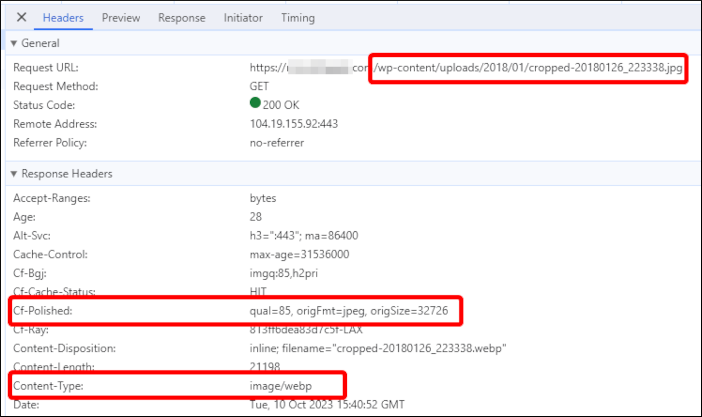
In short, no. Because the optimizations are done in Cloudflare Enterprise, the source files are never changed, and the HTML is delivered unmodified. You can verify that Polish is working by viewing the HTTP headers for images loaded on your site. In the Chrome developer console, click the Network tab, and then load your site. Search for the word “polish” and then click one of the results.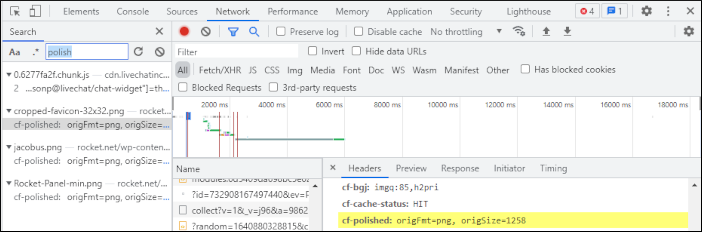 Here is another example that shows the original file format and how Cloudflare’s Polish feature has modified the file at the edge.
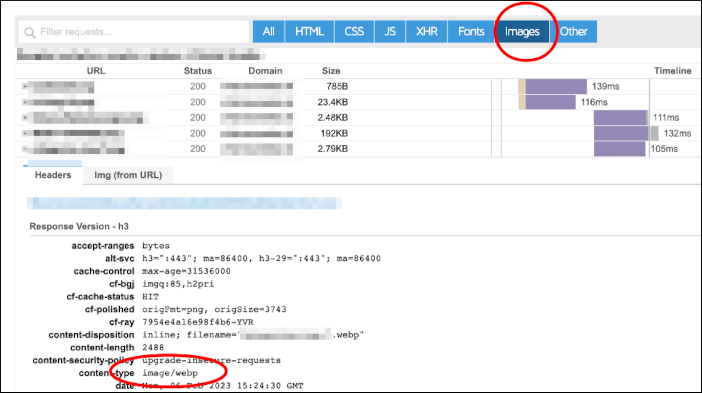
 You can also use the Waterfall view in GTMetrix.com to see the headers which will show which images are being served as WebP images.
 For more information about how Cloudflare’s Polish feature works, go to https://developers.cloudflare.com/images/polish
.
For more information about how Cloudflare’s Polish feature works, go to https://developers.cloudflare.com/images/polish
.