

Cancelling a product or service
You can cancel a product or service associated with your account at any time. To do this, follow these steps:- Log in to the Hosting Panel at https://clients.mochahost.com.
- Locate the product or service you want to cancel, and then click Manage.
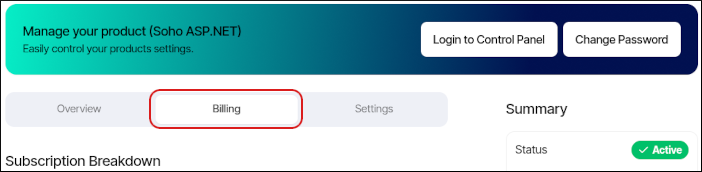
- Click the Billing tab:
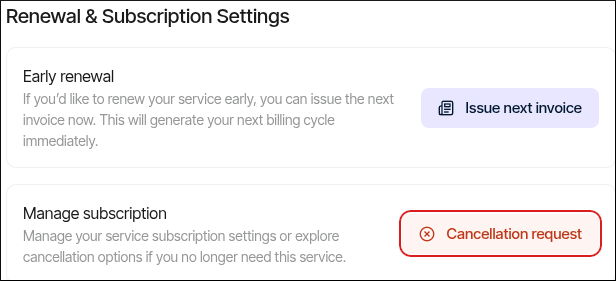
- Scroll down to the end of the page, and then in the Renewal & Subscription Settings section, click Cancellation request:
- In the Product cancellation request dialog box, please specify when you want the cancellation to take effect, and a reason for the cancellation:
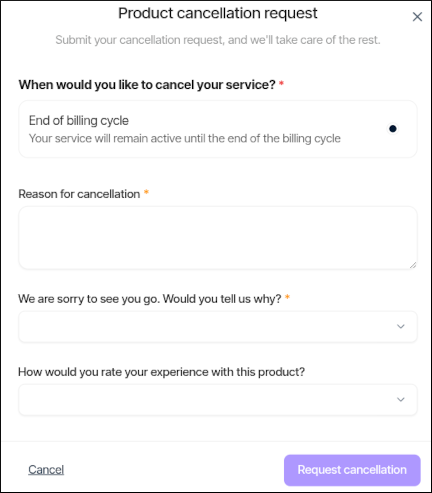
📘 Note For cancellations at the end of the billing period, accounts are suspended for 14 days. During this 14-day grace period, if you change your mind you can reactivate your account with all of your data intact. At the end of the 14-day grace period, the account is terminated and all data is removed.
- Click Request cancellation.
After cancellation
For cancellations at the end of the billing period, you have a subsequent 14-day grace period during which you can reactivate your account if you change your mind, or you can back up your data to a safe location. At the end of the 14-day grace period, the account is terminated and all data is removed. For immediate cancellations, Mochahost does not retain any data after you cancel a product or service. Make sure you back up any data that you want to save before an immediate cancellation.📘 Note To initiate an immediate cancellation, you must open a billing ticket on the Hosting Panel at https://clients.mochahost.com.Also, if you cancel a hosting account that uses Mochahost for DNS, please note that you must update the DNS name server entries (and any additional custom DNS records you may have created).