

Configuring automatic renewal for a domain
For greater convenience, you can configure your domains for automatic renewal. When automatic renewal is enabled, Mochahost automatically sends you a renewal invoice 14 days before before the domain expires. This provides you with enough time to complete the renewal process before domain expiration. To configure automatic renewal for a domain, follow these steps:- Log in to the Hosting Panel at https://clients.mochahost.com.
-
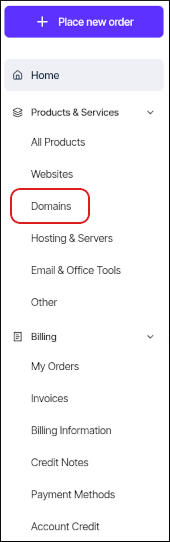
In the left sidebar, under Products & Services, click Domains:
- On the Domains page, click the domain you want to configure for automatic renewal.
- Click the Billing tab.
-
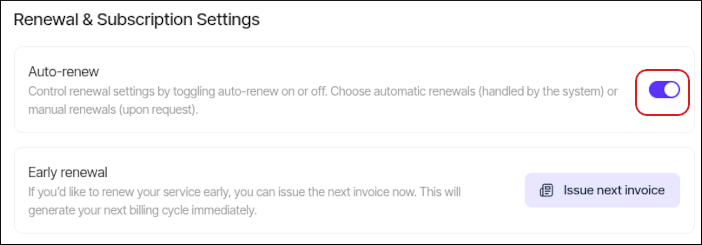
Scroll down the page to the Renewal & Subscription Settings section, and then click the Auto-renew slider to enable or disable automatic renewal:
Renewing a domain
To renew a domain that you previously purchased from Mochahost, follow these steps:- Log in to the Hosting Panel at https://clients.mochahost.com.
-
In the left sidebar, under Products & Services, click Domains:
-
On the Domains page, click the domain you want to renew.
👍 Tip You can filter the list of domains to only display active, canceled, or all domains. To do this, click the Active, Cancelled, Pending Cancellation, or All tab.
- Click the Billing tab, and then pay the invoice for the domain renewal.